Run a short, time-boxed challenge with a tiny daily ask and visible proof. That's the fastest way to spark real activity in a Twitch chat or a membership forum that's gone quiet. Two formats do most of the heavy lifting: a 5-day onboarding sprint for new members and a 48-hour micro-drop for existing ones. Below you'll find a full menu of ready-to-run ideas, platform-specific setup notes, and a checklist that keeps any of them from fizzling out by day three.
TL;DR:
- Short, time-boxed challenges with tiny daily tasks significantly boost activity, especially when verified through simple proof methods like reactions or chats.
- Community size and platform influence challenge duration, with smaller groups best suited for brief micro-drops and larger communities supporting longer, more complex sprints.
- Planning for mid-challenge drops with early spotlights and surprise incentives prevents participation decline and maintains momentum.
- Embedding live leaderboards and real-time progress updates encourages ongoing engagement and repeat participation across platforms.
- Clear, measurable goals and repeated challenge formats foster community habits and long-term involvement more than theme variety or novelty.
Table of Contents
- Community challenge ideas organized by goal
- How to choose the right challenge format
- Setup checklist: pre-launch through follow-up
- Platform-specific tactics that actually work
- Running an embeddable contest with a live leaderboard
- Three rules that separate a challenge that works from one that fizzles
- Host your next challenge with an embeddable leaderboard
- Sources
Community challenge ideas organized by goal
The best community challenge ideas map to a specific job. Some are built to activate new people, some to generate content you can repost, some to build a habit that keeps members coming back. BuddyBoss's rundown of competition formats ties each format to a distinct member action, and that pairing matters more than the theme you slap on top.
Onboarding sprints (3–5 days). New members do one small task per day: introduce themselves, pick a favorite team or player, share a prediction. The daily ask is one sentence in a dedicated channel. Verify completion with a reaction emoji or a pinned checklist. Reward: a "Rookie" role badge, or a shoutout in the next stream.
Content-creation prompts (5–7 days). Ask participants to post one photo, meme, or short video around a daily prompt ("show your setup," "worst take of the week," "prediction fail"). Proof is the post itself, tagged with a hashtag or dropped in a specific channel. Reward: feature the best three in your next video or newsletter.
Habit and accountability sprints (14–30 days). These work for fitness, budgeting, or skill-building communities riding along with sports content, think "watch and log one game a week" or "post one training clip daily." The finish line has to be measurable: 20 out of 30 days logged, not "try your best." Reward: a completion badge plus entry into a raffle for members who hit the full streak.
48-hour micro-drops. Announce a challenge with almost no warm-up: a prediction contest for the weekend's games, a trivia sprint, a caption contest. Short windows paired with creator seeding and instant micro-rewards are one of the highest-engagement patterns going into 2026, according to Challenges. The daily ask is a single entry; proof is a form submission or a chat command.
Themed tournaments. Bracket-style prediction contests, fantasy mini-leagues, or head-to-head trivia matchups tied to a real sports calendar (playoffs, rivalry week, a draft). Length: one week to one month depending on bracket size. Reward: leaderboard placement plus a modest prize for the top three.
Viewer-crowdfunded community challenges. Set a collective goal, like "if we hit 500 chat messages this stream, I'll run a bonus game," and let the audience push toward it together. Proof is automatic (the metric itself). Reward: the bonus content is the reward.
30-day wellness or creative prompts. A daily photo, a daily sketch, a daily reflection. These run longer, so keep the daily ask under two minutes of effort. Verification: a shared album or thread. Reward: a compiled recap video crediting every participant.
UGC contests. Ask for fan art, highlight edits, or "best moment" clips tied to a sports season or event. Length: one to two weeks. Proof: submission via a form or tagged post. Reward: feature the winner as a channel emote or profile banner for a month.
Scavenger hunts. Hide clues across your Discord, stream, and social posts; participants piece together an answer. Works well for launch events or milestone celebrations (1,000 followers, a new season kickoff). Proof: first correct DM or form submission wins.
Charity or community service drives. Pair a fundraising goal or volunteer log with your existing challenge format, matching donations to milestones, or asking members to log a volunteer hour and share a photo. These tend to run 7–14 days and pull in members who don't care about leaderboards but do care about the cause.
Ready-to-copy daily prompts you can drop into any of the above: "Post your prediction for tonight's game," "Share one thing you're grateful for this week," "Tag a friend who needs to join this community," "Post a 10-second clip of your best play," "Comment your bracket pick," "Share your setup or workspace," "React with your team's emoji," "Submit your caption for this screenshot," "Log today's workout or activity," "Post a throwback moment from this community," "Vote in today's poll," "Share your streak count," "Tag your prediction partner," "Drop your favorite stat from this week," "Submit your fan art or edit."
Pro Tip: Keep the daily task deliberately tiny. For most audiences, a one-sentence post, a 10-second clip, or a single reaction outperforms a bigger ask every time, according to Circle's community challenge playbook.
For streamers specifically, a Channel Points-pooled challenge (viewers redeem points toward a collective goal, like unlocking a bonus segment) works better than an individual leaderboard because it rewards the whole chat, not just your most active regulars. For membership sites, a gated 30-day habit sprint with a badge unlock at day 30 tends to outperform a public leaderboard, since retention, not virality, is the actual goal.
How to choose the right challenge format
Start by naming the job. Activation challenges (onboarding sprints, welcome-week tasks) get new people participating fast. UGC challenges (content prompts, fan art contests) generate material you can reuse. Retention challenges (habit sprints, recurring tournaments) keep existing members showing up. Watch-time challenges (micro-drops, Channel Points pools) are built for live audiences who are already there.
Run your idea through four quick checks before committing:
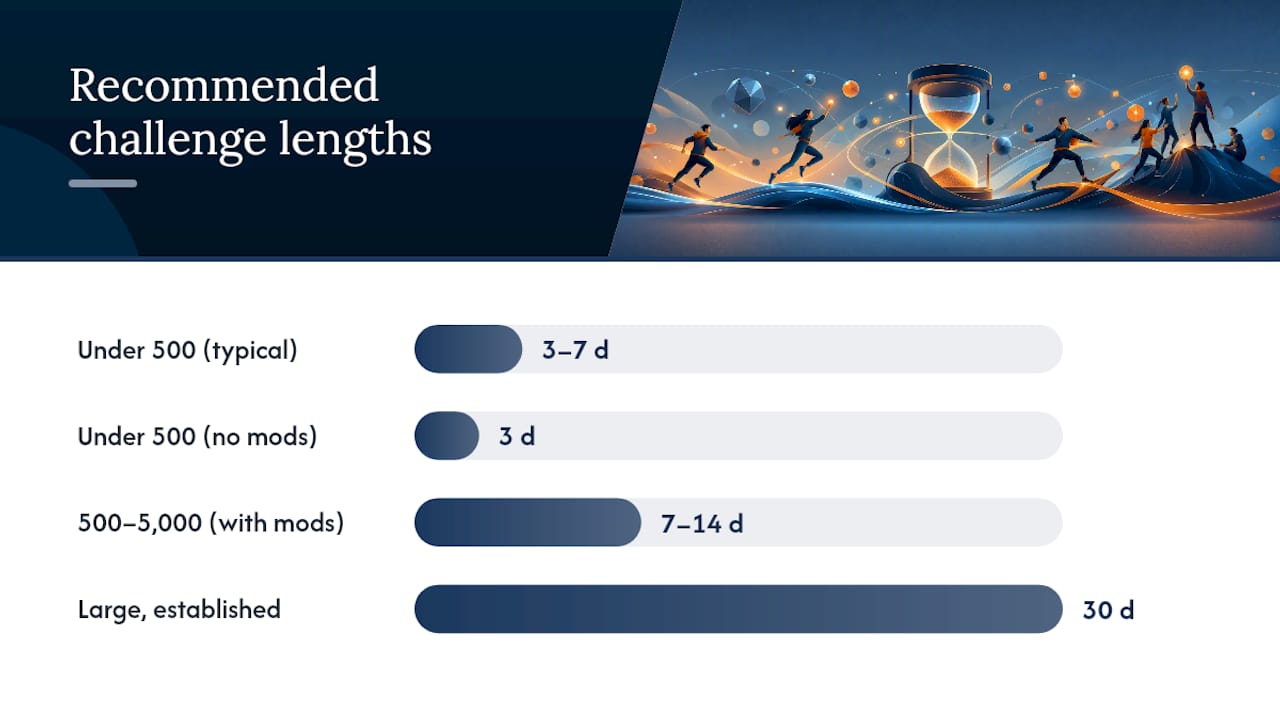
- Community size. Under 500 active members or viewers, run a 3–7 day sprint. Bigger communities can sustain 14 to 30-day formats without losing steam.
- Platform affordances. Twitch rewards live, chat-driven mechanics. Discord rewards threaded, asynchronous proof. Membership sites reward gated content and scheduled check-ins.
- Moderation capacity. If you're the only one verifying submissions, keep the daily ask simple enough to check in under 10 seconds per person.
- Prize budget. Zero budget still works, badges and shoutouts scale infinitely. A prize budget under $50 covers most micro-drops and sprints comfortably.
If you have fewer than 500 members and no moderation help, run a 3-day micro-drop. If you have an active core of 500 to 5,000 and some volunteer moderators, a 7 to 14-day content or habit sprint fits. If you're managing a large, established community with dedicated mods, a 30-day tournament or recurring monthly challenge makes sense.
Setup checklist: pre-launch through follow-up
A well-run challenge needs a specific, measurable goal and a fixed window. Circle's community playbook flags fuzzy goals, oversized daily asks, low visibility, and no plan for mid-challenge drop-off as the four most common failure points, in that order of frequency.
Pre-launch:
- Define one measurable finish line ("30 submissions," "20 of 30 days logged")
- Pick your proof method before you announce anything (form, hashtag, reaction, chat command)
- Prepare graphics, pinned posts, and a rules doc in advance
- Schedule reminder posts across the full challenge window, not just day one
Launch day:
- Kick off with clear, visible messaging: what to do, how long, what's at stake
- Set up a public proof channel or on-stream overlay so progress is visible in real time
- Post a simple leaderboard, even a manual one in a pinned message counts
Mid-challenge:
- Spotlight two or three participants publicly around the halfway point
- Drop a small surprise micro-incentive if participation dips, this is when most challenges lose momentum
- Seed a creator or top contributor early to model what a good submission looks like
Post-challenge:
- Announce winners publicly and specifically, name the person and what they did
- Collect the best submissions into a recap post or video
- Ask the same audience if they'd run it again before you plan the next one
One in four community challenges reportedly stalls specifically because organizers never account for that mid-challenge dip, per the same Circle analysis. Planning for it up front costs you five minutes and saves the entire event.
Platform-specific tactics that actually work
The mechanics change depending on where your community lives, even when the challenge format stays identical.
- Twitch: Pool Channel Points toward a collective goal and unlock a reward when the pool fills. Verify individual entries through chat commands (
!enter) or clip submissions rather than trying to track everything manually. - Discord: Pin a challenge thread, use a bot for daily check-ins, and accept reaction emojis as lightweight proof of participation. Tie completion to a role reward that's visible in the member list.
- Membership platforms and email: Build a simple landing page with the rules and daily prompts, then send scheduled check-in emails. Gate a badge or bonus content behind full completion to reward the people who finish.
- Cross-posting: Turn daily highlights into short-form clips, attach a consistent hashtag, and embed your leaderboard somewhere visible, like a pinned Discord message or a widget on your site, so newcomers can see momentum without asking.
Running an embeddable contest with a live leaderboard
Megasports Arena builds embeddable contests, active leaderboards, and reusable contest templates that map directly onto the challenge formats above. A basic template looks like this: pick a prompt (a weekly prediction, a trivia round, a bracket pick), set a scoring rule, display a live leaderboard so standings update in real time, and offer a reward tied to top placement, a badge, a shoutout, or a small prize for the top three.
Embedding an interactive leaderboard on your own site or linking to one gives participants a reason to check back that a static post never does. It turns a one-off challenge into something people revisit.
Communities that embed a leaderboard alongside a challenge page tend to see repeat visits climb, since the leaderboard itself becomes a reason to come back, not just the prize at the end.
Three rules that separate a challenge that works from one that fizzles
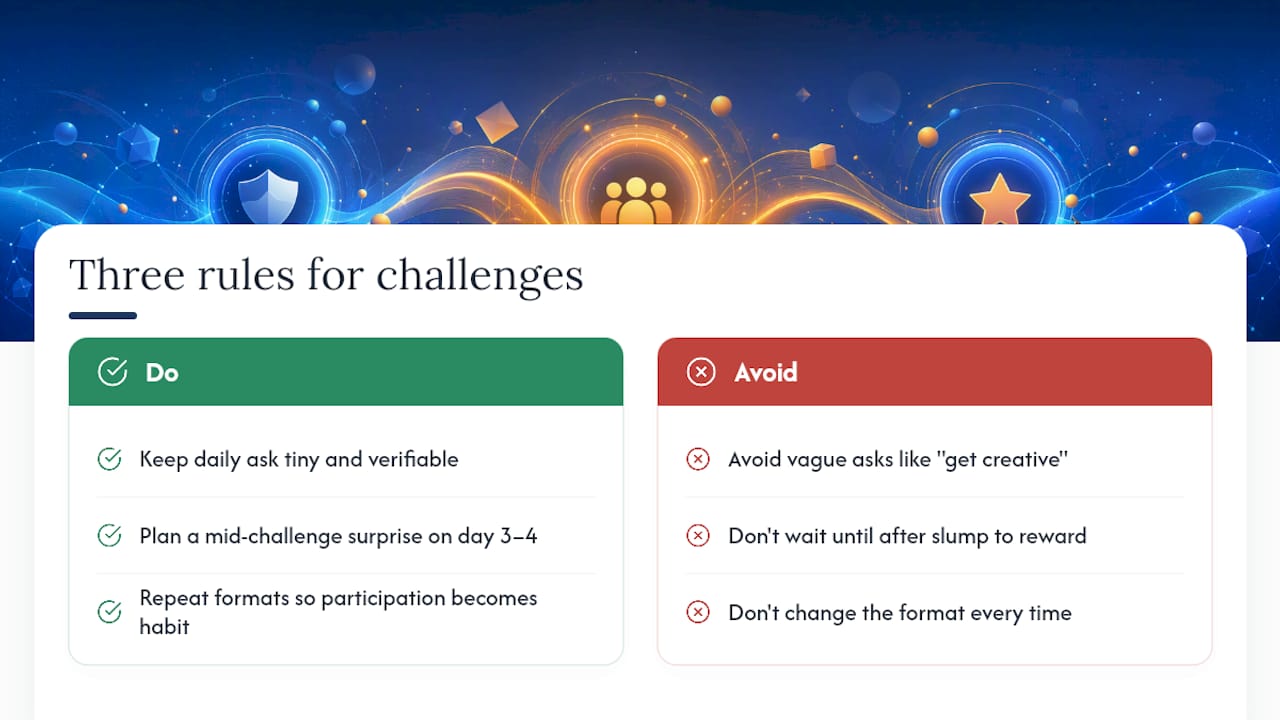
Most challenge advice focuses on the theme, sports trivia versus fitness streaks versus fan art, when the theme almost never determines whether a challenge succeeds. Three structural rules matter far more than any creative concept.
First, the daily ask has to be tiny and verifiable. Not "get creative" or "share your thoughts," but something you can check in ten seconds: a reaction, a one-line comment, a form field. Second, plan for the mid-challenge slump before it happens. Every multi-day challenge loses energy around the halfway mark, and the organizers who survive it built a spotlight or a surprise reward into day three or four, not after participation already dropped. Third, repeat your formats. A community that knows "first Friday of the month is trivia night" shows up without being reminded, while a community facing a brand-new concept every time has to relearn the rules each round. Predictability, not novelty, is what turns a one-off event into a habit.
— peter
Host your next challenge with an embeddable leaderboard
You can run a challenge with nothing but a pinned Discord message and an honor system, plenty of organizers do exactly that, as explained in Team Building – Archers Battlefield. But once your community outgrows manual tracking, Megasports Arena gives you the missing piece: embeddable contests, live leaderboards, and ready-made contest pages you can drop into a stream overlay, a Discord link, or your own site without building anything from scratch.

Pair a scavenger hunt or prediction challenge with a live leaderboard, and participants get instant, visible proof of where they stand, no spreadsheet required. If you're running a sports-themed community, sports rummy works as a drop-in interactive element you can point your audience to right now, and the leaderboard tracks standings automatically. Check out the active contests page and pick one to embed for your next challenge.
Sources
For the operational side, Circle's challenge playbook breaks down common failure points in detail. BuddyBoss's competition guide maps formats to member actions. For neighborhood-style or hybrid projects, the ATSDR community engagement playbook offers a tested activity structure, and Megasports Arena's challenge templates are ready to embed today.
- How to run a community challenge — Circle
- 7 Community Competition Ideas That Actually Drive Engagement — BuddyBoss
- Challenges