
User-generated pools are fan-run fantasy or prediction contests that a community member creates, hosts, and manages, usually for a group of friends, coworkers, or an online sports community. You pick the format, set the scoring, schedule the games, and invite players with a shareable link. The fastest path to launch: choose a DIY pool platform like Megasports-arena, select a scoring model, write a short rules document, and send out a vanity invite link. Done right, you can have your first pool live in under an hour.
Every pool that lasts more than one season shares the same core elements at launch:
- Scoring model — point values per correct pick, tiebreak method, and weekly or cumulative totals
- Schedule — contest dates tied to real game calendars, with entry deadlines locked before tip-off or kickoff
- Public leaderboard — visible to all participants, updated automatically after each game
- Invite link — a vanity URL or short share link players can forward in one tap
- Prize method — free-to-play bragging rights, reward points, or a declared prize pool with clear payout rules
- Archived results — a permanent record of each week's standings to prevent disputes and fuel next-season interest
- Sample scoring template — a reference table organizers and players can check at any time
Public leaderboards, archived results, and a pinned scoring template are the three trust signals that separate pools people return to from ones that quietly die after week two.
Table of Contents
- How do you create your first user-generated pool step by step?
- What features make a community pool sticky and viral?
- How do you run and scale your pool without becoming the bottleneck?
- What are the U.S. legal and safety rules for running a sports pool?
- Copy-paste rules, scoring table, and prize-handling template
- Key Takeaways
- Why the GM mindset changes everything about running a pool
- Megasports-arena makes it easy to build and host your pool
- Sources and next steps
How do you create your first user-generated pool step by step?
Step 1: Choose your format and scoring rubric
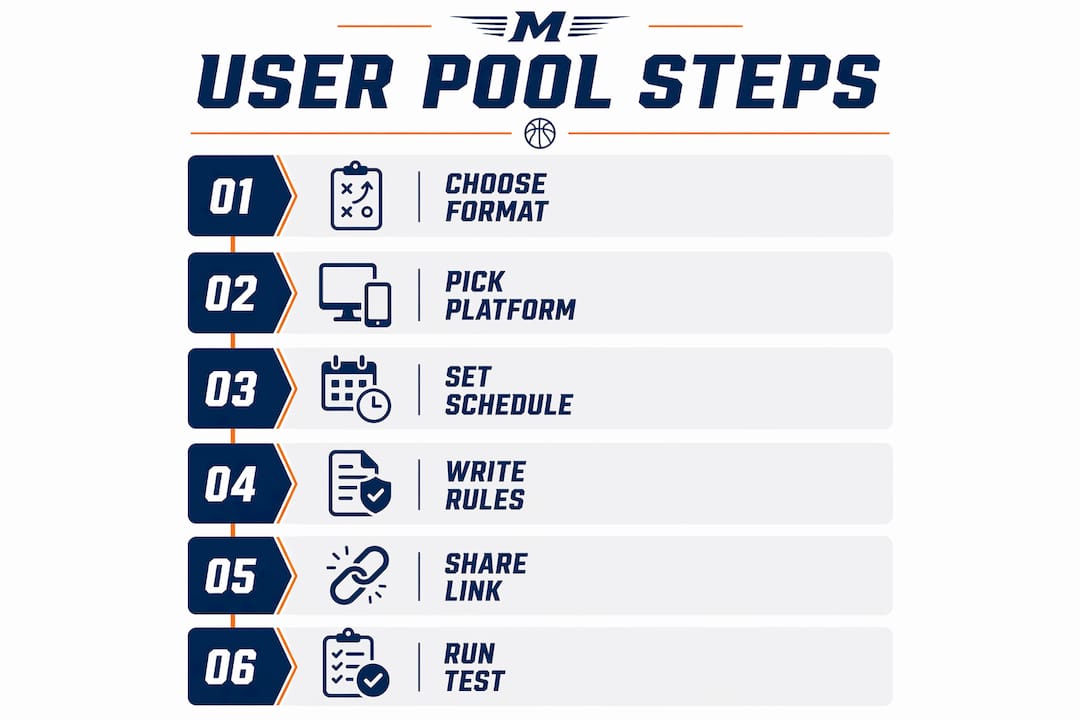
Pick one format before you touch any platform. The five most common are survivor (one pick per week, wrong pick eliminates you), pick'em (predict game winners), prediction (point spreads or exact scores), trivia, and bracket. Each needs a different scoring rubric. A pick'em pool might award one point per correct winner; a prediction pool might scale points by margin accuracy. Write the rubric in plain language before you open any setup screen.
Step 2: Pick your platform
Spreadsheets and email chains work for five people. For anything larger, an integrated platform handles scoring, leaderboards, and notifications automatically. Megasports-arena is the recommended host for free-to-play custom sports pools: it combines automated leaderboards, contest scheduling, archived results, and shareable invite links in one place, removing the manual overhead that kills most DIY pools by week three. The difference between a spreadsheet and a real platform shows up the first time you have to manually recalculate a tiebreaker at midnight.
Step 3: Set your schedule and automated scoring rules
Map every contest date to the real sports calendar. Decide whether scoring updates game-by-game or as a weekly summary. Game-by-game keeps engagement higher; weekly summary is easier to manage. Expect to spend 20–30 minutes configuring scoring rules on a platform the first time. After that, automation handles it.
Step 4: Write your house rules before invites go out
This is the step most organizers skip, and it causes every dispute. Write a one-page rules document covering eligibility, entry window, scoring method, tiebreaker, prize distribution, and the dispute process. Pin it publicly inside the platform. Clear public rules and archived results are the primary factors that keep leagues recurring season after season.
Step 5: Create your invite link and share it
Generate a vanity URL from your platform. Write three lines of invite copy: what the pool is, when it starts, and the link. Share it across Discord, group chats, Twitter/X, and any sports community you belong to. Vanity URLs lower the barrier to join because participants share them inside their own social circles without friction.
Step 6: Run a soft-launch test
Before opening entries to everyone, run 3–5 test entries yourself. Verify that scoring calculates correctly, leaderboard updates after each simulated result, and notifications fire on schedule. Fix anything that breaks now, not after 40 people have entered.
Pro Tip: Enable automated leaderboards and archived results from day one. Automated scoring saves organizers significant hands-on time during active season and gives players a transparent record they can reference anytime.
What features make a community pool sticky and viral?
The pools that grow season over season share a specific set of features. Some are social, some are operational, and skipping either category tends to show up in participation drop-off by week four.
Social and sharing features:
- Vanity URLs that participants can personalize and forward
- One-click sharing to Twitter/X, Discord, and group messaging apps
- Embed widgets so a pool can live inside a team's website or Discord server
- Referral invites that track who brought in new players
Engagement features:
- Real-time notifications after each game result posts
- Public leaderboards visible to all participants, not just the leader
- Archived results accessible after the season ends
- Milestone badges (first correct pick, longest streak, comeback of the week)
- Reward points that accumulate across multiple contests
Administration features:
- Configurable scoring rules per contest type
- Automatic tiebreakers based on preset criteria
- Multi-timezone scheduling so participants in different states see correct deadlines
- Participant management tools for adding, removing, or messaging players
Two quick examples show which features matter most by format. A March Madness-style bracket lives or dies on real-time leaderboard updates and one-click sharing, because the drama peaks in the first 48 hours of the tournament. A weekly prediction league depends more on automated notifications and archived results, since engagement is spread across months and players need consistent reminders to stay active.
Pro Tip: Pair vanity URLs with scheduled multi-channel notifications sent 24 hours before each entry deadline. Platforms with multi-channel alerts consistently show higher participation rates than those relying on a single reminder channel.
How do you run and scale your pool without becoming the bottleneck?
Treat yourself as the General Manager. Your job is to set strategy, delegate tasks, and let the platform handle execution. Scaling succeeds when organizers delegate and use automation for scoring and scheduling rather than doing everything manually.
Automation checklist:
- Automated scoring after each game result
- Scheduled announcements (entry open, deadline reminder, results posted)
- Archival of weekly standings to a permanent results page
- Auto-tiebreakers based on preset secondary criteria
- Auto-award triggers for reward points or digital prizes where applicable
Roles template for a pool with 20+ participants:
- GM (you) — sets rules, manages platform settings, resolves escalated disputes (2–3 hours per week during active season)
- Co-admin — backup access, covers GM absences, monitors entries (1–2 hours per week)
- Moderator — watches community channels, flags rule questions, keeps tone positive (1 hour per week)
- Stats lead — spot-checks automated scoring for accuracy after major game days (30 minutes per week)
- Communications lead — writes weekly recap messages and milestone shoutouts (1 hour per week)
For pools under 20 players, the GM and co-admin roles are usually enough. The stats lead becomes critical once you're running prize-backed contests where a scoring error has real consequences.
Pro Tip: Consistent communication, including weekly recaps and automated notifications, is what separates recurring pools from one-off events that fade after the first few weeks.
What are the U.S. legal and safety rules for running a sports pool?
The short answer: keep it free-to-play or skill-based, and you stay on solid ground in most U.S. states. The moment you collect entry fees and award cash prizes, you may be operating a gambling contest under state law, and the rules vary significantly by state.
Compliance checklist:
- Free-to-play pools with no entry fee and no cash prizes carry the lowest legal risk
- Skill-based contests (prediction accuracy, trivia) are treated differently from pure chance in many states, but definitions vary
- Prize-backed pools with entry fees should be reviewed by a local attorney before launch
- Never collect more personal data than you need: name, email, and payment info for prize winners only
- Use platform privacy settings to limit data visibility to participants only
- Keep a recordkeeping file for every prize awarded: winner name, prize description, date, and delivery confirmation
Typical platform parameters for configurable pools:
| Parameter | Typical Range | Notes |
|---|---|---|
| Entry fee (free-to-play) | — | No fee, no gambling classification risk |
| Reward points value | Non-cash | Points redeemable for platform perks, not cash |
| Prize pool (prize-backed) | Varies by state law | Consult counsel before collecting entry fees |
| Data retention | Minimum needed | Name and email for winners; delete after season |
Pro Tip: Add a one-line disclaimer to your rules document: "This contest is intended for entertainment purposes only and is not affiliated with any professional sports league." It costs nothing and signals good faith to participants and platforms alike.
This guide is general information, not legal advice. Confirm your pool's structure with a qualified attorney if you plan to collect entry fees or award cash prizes.
Copy-paste rules, scoring table, and prize-handling template
Copy the sections below into your platform's rules field or a shared document. Replace the bracketed fields with your contest specifics.
How to use this template: paste it into your platform's rules page, fill in the bracketed fields, and pin it publicly before opening entries. Public rules and archived results are the primary factors in reducing disputes.
Sample scoring table
| Event | Points Awarded | Tiebreaker Weight |
|---|---|---|
| Correct winner pick | 1 point | Primary |
| Correct score within 3 points | 2 points | Secondary |
| Exact score match | 5 points | Tertiary |
| Weekly bonus (most points in week) | 1 bonus point | N/A |
| Season total | Cumulative | Final standings |
Rules checklist
- Eligibility: Open to [age 18+/all ages]. One entry per person.
- Entry window: Opens [date], closes [date/time] before first game.
- Scoring method: Per the table above; automated by platform after each game.
- Tiebreaker: Highest single-week score; if still tied, earliest entry timestamp.
- Prize distribution: [Free-to-play bragging rights / reward points / digital gift card to winner].
- Dispute process: Submit disputes within 48 hours of results posting; GM decision is final.
Prize distribution options
- Free-to-play: Public leaderboard recognition, milestone badges, and season archive listing
- Reward points: Platform points redeemable for contest entries or platform perks
- Digital gift: Email delivery of a gift card or sponsor-provided reward to verified winner
Pro Tip: For prize-backed pools, send a confirmation email to each winner with prize details and keep a copy. A public leaderboard archive serves as your dispute-proof record of who finished where.
Key Takeaways
User-generated pools succeed when organizers combine a clear scoring model, automated leaderboards, and consistent social sharing from day one.
| Point | Details |
|---|---|
| Write rules before invites | Pin a house rules document publicly before opening entries to prevent eligibility and scoring disputes. |
| Automate leaderboards and scoring | Platform automation removes the manual overhead that causes most DIY pools to collapse by week three. |
| Use vanity URLs and multi-channel sharing | Shareable links and scheduled notifications consistently drive higher participation than single-channel invites. |
| Keep it free-to-play for simplicity | Free-to-play pools carry the lowest legal risk; consult an attorney before collecting entry fees or awarding cash. |
| Megasports-arena as your host | Megasports-arena combines automated leaderboards, contest scheduling, archived results, and shareable invite links for free-to-play pools. |
Why the GM mindset changes everything about running a pool
Most pools fail for the same reason: the organizer tries to do everything themselves. They manually update scores, chase down entries, and answer the same rules question twelve times. By week four, it stops being fun.
The GM framing fixes this. A GM sets the system up correctly, delegates roles, and trusts the platform to handle execution. The organizer who spends 30 minutes configuring automated scoring on day one saves hours every week for the rest of the season. That's not a small efficiency gain; it's the difference between a pool that runs for one season and one that becomes an annual tradition people actually look forward to.
The other thing most guides underestimate is how much social architecture matters. A pool with a vanity URL, weekly recap notifications, and a public leaderboard generates its own momentum. Players share standings without being asked. The leaderboard becomes a conversation starter. Archived results give the whole group something to reference and argue about in the offseason.
The tools exist to make this easy. The only thing standing between a good idea and a pool people love is the willingness to set it up properly before the first invite goes out.
Megasports-arena makes it easy to build and host your pool
Free-to-play custom sports pools are exactly what Megasports-arena is built for. Instead of stitching together a spreadsheet, a group chat, and a manual prize tracker, you get automated leaderboards, contest scheduling, archived results, and shareable invite links in one place, at no cost to players.

The platform's features map directly to the checklist in this guide: configurable scoring rules, public leaderboards like the Sports Rummy leaderboard, automated notifications, and a permanent archive of results that doubles as your dispute-resolution record. You can see exactly how a finished leaderboard looks before you build your own.
Getting started takes three steps: create your account, set up your contest in My Contests, and send your vanity invite link. Your first pool can be live today. Head to My Contests and build it.
Sources and next steps
Sources used in this guide:
- Build Your Own Pool — DIY pool organizer best practices, house rules, and automation guidance
- Swim DIY — GM framing, delegation, and recurring pool communication strategies
- UPool on GitHub — social features, vanity URLs, and multi-channel notification patterns
- Megasports-arena leaderboard examples — live examples of public leaderboards and archived results
- Megasports-arena March Madness pool ideas — ready-made format templates organizers can adapt
Your next steps:
- Pick your format (survivor, pick'em, prediction, trivia, or bracket) and write your scoring rubric
- Run a 3-player test before opening entries to verify scoring and notifications
- Schedule your first automated notification for 24 hours before the entry deadline
- Archive your week-one standings immediately after results post
- Return to My Contests to set up your next contest using the same template