
Game rewards points are a soft currency you earn for playing, engaging, or spending on a gaming platform, then trade in for digital items, merch, discounts, or event access. Getting value out of them takes three moves: sign in and check your dashboard, browse the rewards catalog, then redeem or convert.
- Sign in or register for your rewards account.
- Open your balance dashboard to see current points.
- Browse the redemption catalog before you commit to a big purchase.
- Redeem or convert points, checking for fees, taxes, or region locks first.
Pro Tip: Check your balance dashboard before every big purchase decision. Some programs quietly expire idle points, and you don't want to lose value you already earned.
Key Takeaways
Points systems reward frequent, varied engagement more reliably than one-time big spends, and checking your dashboard and program terms regularly protects the value you've already earned.
| Point | Details |
|---|---|
| Points are a soft currency | Earn them through play, engagement, or spending, then redeem for items, merch, discounts, or access. |
| Check terms for expiration | Many programs use a 12-month rolling expiry window, so idle points can quietly disappear. |
| Stack earning channels | Combine app activity, in-platform actions, and linked storefronts to capture more bonuses. |
| Compare redemption value | Use a 100-points-to-$1 baseline or percentage-back rates to judge whether a reward is worth it. |
| Megasports Arena fits sports fans | Its leaderboard and trivia-based earning model suits players who want engagement, not just purchases, to pay off. |
Table of Contents
- How Does a Game Rewards Points System Actually Work?
- What Actions Actually Earn You Points?
- How Do You Redeem Points, and What Are They Worth?
- What Rules and Exclusions Should You Watch For?
- How Can You Get More Value From Your Points?
- What Makes Megasports Arena's Rewards Program Different?
- How Secure Is Your Rewards Account?
- How Do Different Game Rewards Programs Compare?
- What Limits Might Block Your Redemption?
- Ready to Start Earning on Megasports Arena?
- Frequently Asked Questions
- Sources
How Does a Game Rewards Points System Actually Work?
Every points program runs on two rule sets: how you earn and how you spend. Earning usually follows one of a few models: a fixed amount per action (10 points for logging in), a proportional rate tied to spending ($1 spent equals 1 point), event bonuses during promotions, or tier multipliers that boost your normal rate. Loyalty points function as a soft currency inside a specific ecosystem, and most systems mix at least two of these models to keep engagement steady.
Tiered status adds another layer. Reaching a higher tier often unlocks a multiplier, say 1.5x points on qualifying actions, but tier status and your points balance don't expire the same way. Status can reset on a calendar year while your point balance runs on its own rolling clock.
| Mechanic | What it typically looks like |
|---|---|
| Fixed earn rate | A flat point amount per action, like 10 points for a daily login |
| Proportional earn rate | Points tied to dollars spent, often 1 point per $1 |
| Tier multiplier | A status boost, such as 1.5x points on eligible actions |
| Earn caps | Daily or monthly limits, like a capped number of qualifying purchases per month |
- Fixed and proportional earning often run side by side in the same program.
- Tier multipliers reward consistency more than any single big purchase.
- Caps exist specifically to stop point inflation, so check them before assuming unlimited upside.
What Actions Actually Earn You Points?
Most programs reward a mix of playing, engaging, and spending, not just spending. The highest-frequency actions tend to be the easiest to overlook because they feel too small to matter, but they add up fast.
- Playing matches or completing in-game quests
- Logging in daily or hitting login streaks
- Answering daily trivia or completing profile setup
- Watching sponsored content or promotional videos
- Referring friends who create their own accounts
- Spending on in-platform games, add-ons, or upgrades
Special events, holiday promotions, and app-only campaigns frequently carry bonus multipliers on top of your normal rate. Bing Rewards documents mixed-channel earning across search, browser use, and store purchases, with each channel counting separately toward your total.
Watch for common exclusions, too. Subscriptions, gift card purchases, refunded transactions, and anything routed through third-party billing typically don't count toward your points balance, even if the purchase happens on the same platform.
Pro Tip: Stack every earning channel available to you, app activity, in-store actions, and any linked storefront, and opt into promotional emails. Mission-based bonuses often go out that way first, and missing them means missing free points.
How Do You Redeem Points, and What Are They Worth?
Redemption follows a predictable path: open your rewards dashboard, browse the catalog, pick a reward, confirm any fees or taxes, then complete the transaction. Some redemptions carry device or regional restrictions, so check eligibility before you commit points you can't get back.
Reward categories vary by platform but usually fall into these buckets:
- Digital in-game items like icons, skins, or cosmetic upgrades
- In-platform currency you can spend elsewhere on the site
- Gift cards redeemable outside the platform
- Discounts on future store purchases
- Event access or entry into limited contests
- Single-use exclusives that can't be earned again once claimed
Play Games Rewards draw a clear line between single-use rewards, like exclusive cosmetics, and repeatable rewards, like in-game currency or boosters you can earn again and again.
By the numbers: A common baseline across loyalty programs sets 100 points equal to $1, though platform-specific programs often quote value differently. Epic Rewards advertises 5% to 20% back when purchases run through its own payment system, and some storefront programs offer similar 5% to 20% ranges on qualifying purchases. Comparing that percentage against the points-to-dollar baseline tells you fast whether a program's redemption menu is generous or thin.
What Rules and Exclusions Should You Watch For?
Expiration is the biggest silent point-killer. Programs typically use one of two patterns: a rolling window, where points expire a set number of months after you earn them, or a fixed calendar date, where everything resets at year's end. A 12-month rolling window is common across loyalty programs, which means points you earned in January could vanish by next January if you never spend them.
- Subscriptions and gift card purchases rarely count toward earning
- Returned or refunded purchases claw back any points you earned
- Region-locked rewards may show in your catalog but block at checkout
- Points can sit pending until an order actually ships or delivers
Some platforms lock or adjust balances during disputes, and daily or monthly caps can quietly limit how fast heavy players accumulate points. Play Games Rewards give players a short window, sometimes just three days, to open the game and claim a granted reward before it expires.
Pro Tip: Set a calendar reminder a month before your points or tier status expires. Save receipts or screenshots for qualifying purchases too. If a redemption ever fails, that proof is what gets your points restored.
How Can You Get More Value From Your Points?
Timing matters more than volume. Double-point windows, app-first bonus periods, and limited event quests routinely offer far better returns than everyday actions, so tracking active campaigns pays off more than grinding daily logins alone.
- Prioritize double-point events and time-limited campaigns over routine earning
- Stack qualifying actions across channels, browser, app, and storefront, when a program allows it
- Use tier status to unlock multipliers, but track when that status expires
- Compare per-point value across gift cards, digital items, and merch before redeeming
Heavy earners should also watch platform caps closely; monitoring daily and monthly limits prevents wasted effort once you hit the ceiling. Smaller, frequent redemptions often keep you more engaged than hoarding points for one big-ticket item you may never actually reach.
Pro Tip: Redeem in smaller batches when a program allows it. Cashing in points regularly for modest rewards tends to feel more rewarding than saving for months toward a single large prize that may lose value before you get there.
What Makes Megasports Arena's Rewards Program Different?
Megasports Arena runs its points system around what sports fans actually do: play matches, climb leaderboards, and check in daily. Signing up takes a minute, and your My Rewards dashboard shows your balance, tier progress, and available catalog items the moment you log in.
Points on Megasports Arena come from several channels:
- Playing fantasy and prediction games across MLB, NBA, NFL, NHL, and more
- Climbing game-specific leaderboards during active contests
- Completing daily sports trivia
- Participating in special events and seasonal promotions
What sets it apart for sports-game players specifically is the catalog: instead of generic gift cards, you'll find in-platform perks, leaderboard boosts, and merch built around the sports fandom experience itself. Your My Rewards dashboard is where you register, track earning, and browse redemption options in one place.
Read the program terms for expiration windows and exclusions before you plan a big redemption, and reach out to support directly if your balance ever looks off. A transparent rewards structure with clear terms is one of the clearest signals a program is worth your time.
How Secure Is Your Rewards Account?
A points balance is real value, and real value attracts fraud attempts, so treat your rewards account with the same care you'd give a payment method. Weak or reused passwords are the most common way accounts get compromised, since attackers often try credentials leaked from unrelated sites first.

Enable two-factor authentication if your platform offers it. That single step blocks the majority of unauthorized login attempts even when a password gets exposed elsewhere. Avoid logging into your rewards account on shared or public devices, and log out fully when you're done, especially if the account is linked to a payment method for redemptions like gift cards.
Watch what personal data a rewards program actually requires. A legitimate program needs an email and maybe a birthdate for age verification, not your full payment history stored indefinitely or unnecessary access to your contacts. Read the privacy policy before linking your account to social platforms or third-party storefronts, since some point-earning bonuses require that kind of connection.
If you ever notice a balance that doesn't match your activity, or a redemption you didn't make, contact support immediately and change your password. Programs that document clear earn rates, caps, and exclusions tend to generate fewer support disputes in the first place, since players know exactly what to expect and can spot anomalies faster.
How Do Different Game Rewards Programs Compare?
Not every points program treats players the same way, and the differences show up in three places: how you earn, what you can redeem, and how easy the whole system is to use day to day.
Some platforms lean heavily on purchase-based earning, where you rack up points mainly by spending money through the platform's own payment system. Others build earning around engagement, rewarding logins, trivia, quests, and leaderboard climbs regardless of whether you spend a dollar. Sports fantasy platforms tend to favor the engagement model since the core product is participation, not transactions.
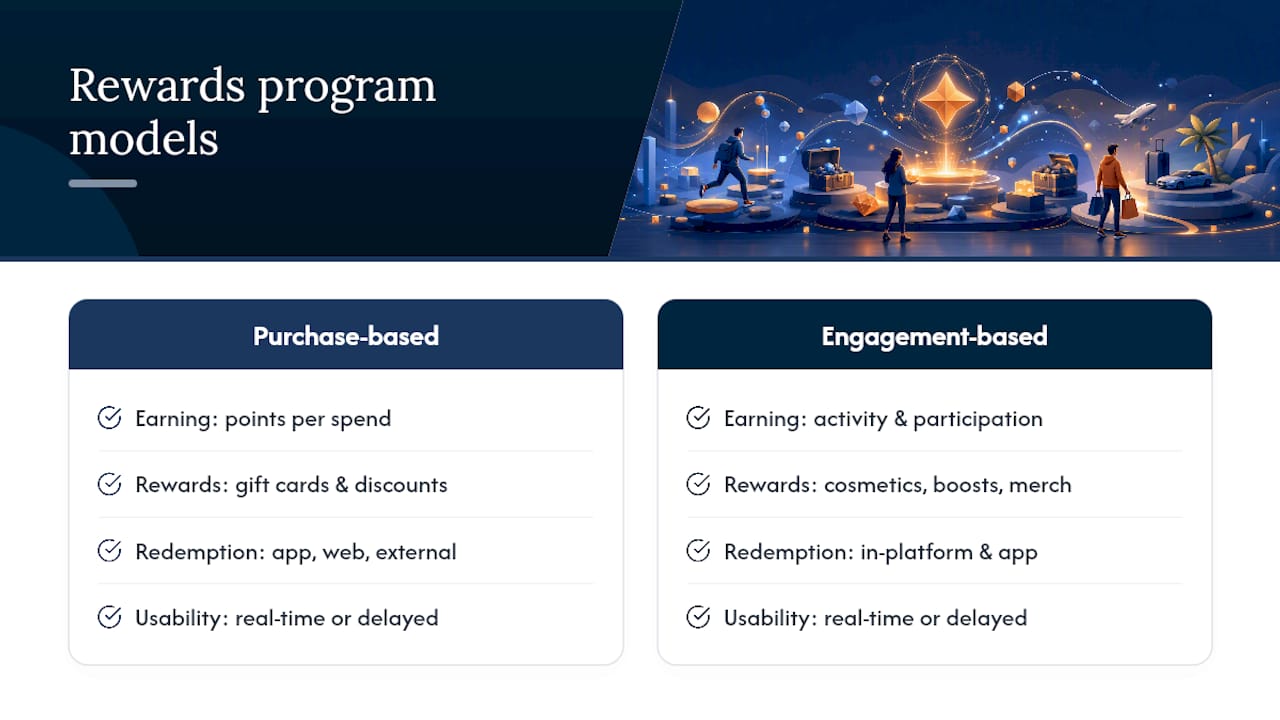
Usability varies just as much. A program with a clean, real-time dashboard where you see points update instantly feels dramatically different from one where your balance only refreshes after a delay or requires digging through account settings. Flexible redemption touchpoints, meaning you can redeem from a mobile app, website, or in-platform menu, are increasingly the standard, and programs that only offer one redemption channel feel dated by comparison.
Reward variety separates programs further. Purchase-driven platforms often lean on gift cards and store discounts. Engagement-driven platforms, including sports fantasy sites, tend to offer perks tied directly to the experience itself, cosmetic upgrades, leaderboard boosts, or merch, which feel more relevant to players who came for the game, not the shopping.
What Limits Might Block Your Redemption?
Even when you've got the points, redemption isn't always guaranteed to go through smoothly. Regional restrictions are the most common blocker; a reward might display in your catalog but fail at checkout because it's only available in certain countries or states, often due to licensing or tax rules tied to physical merch or gift cards.
Device requirements can trip people up too. Some redemptions only process through a specific app version, a particular operating system, or a linked storefront account, so a reward that works fine on desktop might be unavailable on mobile, or vice versa.
Account status matters as well. A rewards account under review for a disputed transaction can have its balance temporarily locked, meaning you technically have the points but can't spend them until the review closes. Programs also commonly enforce minimum redemption thresholds, so you may need to accumulate a base amount before the catalog even unlocks for you.
Finally, timing restrictions apply to certain reward types. Limited event rewards or single-use exclusives often carry short claim windows, sometimes just a few days, after which the offer expires whether or not you've used your points. Checking a reward's fine print before committing saves you from losing points to a redemption that was never going to complete.
Author perspective: why points-based rewards work for players
Points work because they give you autonomy and quick feedback, something flat rewards never manage. Megasports Arena's leaderboards and mission-style bonuses tap into that same instinct: play, see your rank shift, get rewarded, repeat.
Ready to Start Earning on Megasports Arena?
Every strategy in this guide works better once you're actually inside a rewards system built for sports fans instead of retrofitted from a generic loyalty program. Megasports Arena gives you that fit directly: leaderboard-based earning, daily trivia, and contest points tied to the games you're already playing, not a shopping cart you have to fill first.

Getting started takes three steps. Sign in or create your account, open My Rewards to see your dashboard and catalog, then jump into a game that's actively earning points right now. Sports Rummy is a solid first stop since it combines quick rounds with live leaderboard standings, so you'll see your point activity move almost immediately. Check the Sports Rummy leaderboard once you've played a few rounds to see exactly where competitive bonuses come from.
Frequently Asked Questions
What are game rewards points used for? They function as an in-platform currency you redeem for digital items, in-game currency, gift cards, discounts, merch, or event access, depending on the specific program.
Do game rewards points expire? Often, yes. Many programs use a rolling expiration window, commonly around 12 months from when you earned the points, though some use a fixed annual reset instead.
How much is 100 points usually worth? A common baseline across loyalty programs treats 100 points as roughly $1, though platforms that reward purchases through their own payment systems sometimes advertise value as a percentage back, often in the 5% to 20% range.
Can I lose points if I return a purchase? Yes. Refunded or returned purchases typically claw back any points earned from that transaction, and some programs also exclude subscriptions and gift cards from earning altogether.
Why can't I redeem a reward I can see in the catalog? Regional restrictions, device requirements, or account holds are the most common blockers. A reward can appear in your catalog and still fail at checkout if it's not available in your location or on your device.
Sources
- Rewards - Bing
- About – Microsoft Rewards
- Rewards | Android Developers (Play Games Rewards)
- What are loyalty points? Definition, mechanics & system design
- Earn Epic Rewards on Every Purchase When You Pay With Epic