
To embed a live fantasy sports leaderboard, create the board in your dashboard, copy the provided iframe or script snippet, and paste it into your page. Then publish it.
That's the entire process at its core, and for most site builders it takes minutes, not hours. The embed snippet lives in your dashboard's sharing panel, usually labeled "Embed" or "Share Widget." From there, you pick between two formats:
- Iframe snippet: paste it anywhere, works on nearly any CMS, zero coding required.
- Script snippet: slightly more setup, but gives you finer control over sizing and events.
Pro Tip: If you're not sure which format your CMS supports, drop the iframe version into a test page first. It almost always renders without a fight. If something doesn't display right after pasting, check our troubleshooting checklist or visit the Megasports Arena leaderboard hub to see a working example.
Key Takeaways
Embedding a live leaderboard is a copy-paste task when you use the right snippet format and protect your page speed with async loading.
| Point | Details |
|---|---|
| Three-step embed process | Create the board, copy the iframe or script snippet, paste it into your page, and publish. |
| Pick the right integration method | Use iframes for standard CMS pages and JavaScript APIs for SPAs needing lifecycle control. |
| Protect Core Web Vitals | Lazy-load iframes, use a small async loader, and reserve container height to avoid layout shift. |
| Whitelist your domain first | Most blank-embed failures trace back to a missing domain whitelist entry in the dashboard. |
| Megasports Arena as the embed source | Megasports Arena provides ready-made leaderboard widgets with customizable branding and a simple embed snippet for publishers. |
Table of Contents
- How Do You Add a Leaderboard Widget to Your Site?
- Should You Use an Iframe or a JavaScript API?
- Will an Embedded Leaderboard Hurt Your Page Speed?
- How Do You Match the Widget to Your Site's Branding?
- Why Isn't Your Embedded Leaderboard Showing Up?
- Why Embeddable Leaderboards Beat Custom Build-Outs
- Get Your Embed Snippet From Megasports Arena
- Frequently Asked Questions
- Sources
How Do You Add a Leaderboard Widget to Your Site?
Getting a leaderboard live follows the same sequence no matter which fantasy sports platform sits behind it.
- Create and configure your board. In your dashboard, choose the layout (ranked list vs. podium view), set the scoring rules you want reflected, and flip visibility to public.
- Locate the embed snippet. Look for a "Share" or "Embed" tab next to your board. You'll see an iframe block and, often, a script alternative underneath it.
- Paste it into your page. In WordPress, drop it into a Custom HTML block. In Wix, use the embed/HTML iframe element. In Squarespace, add a Code Block set to HTML.
- Publish and verify. Open the live public URL in an incognito window, then trigger a score change (or wait for one) to confirm the board updates without a manual refresh.
This whole workflow, from board creation to a working embed, typically takes minutes for common site builders rather than a full afternoon.
Pro Tip: Test on a staging page or an unlisted post before pushing to your live homepage. A misplaced container or theme conflict is much easier to fix when nobody's watching.
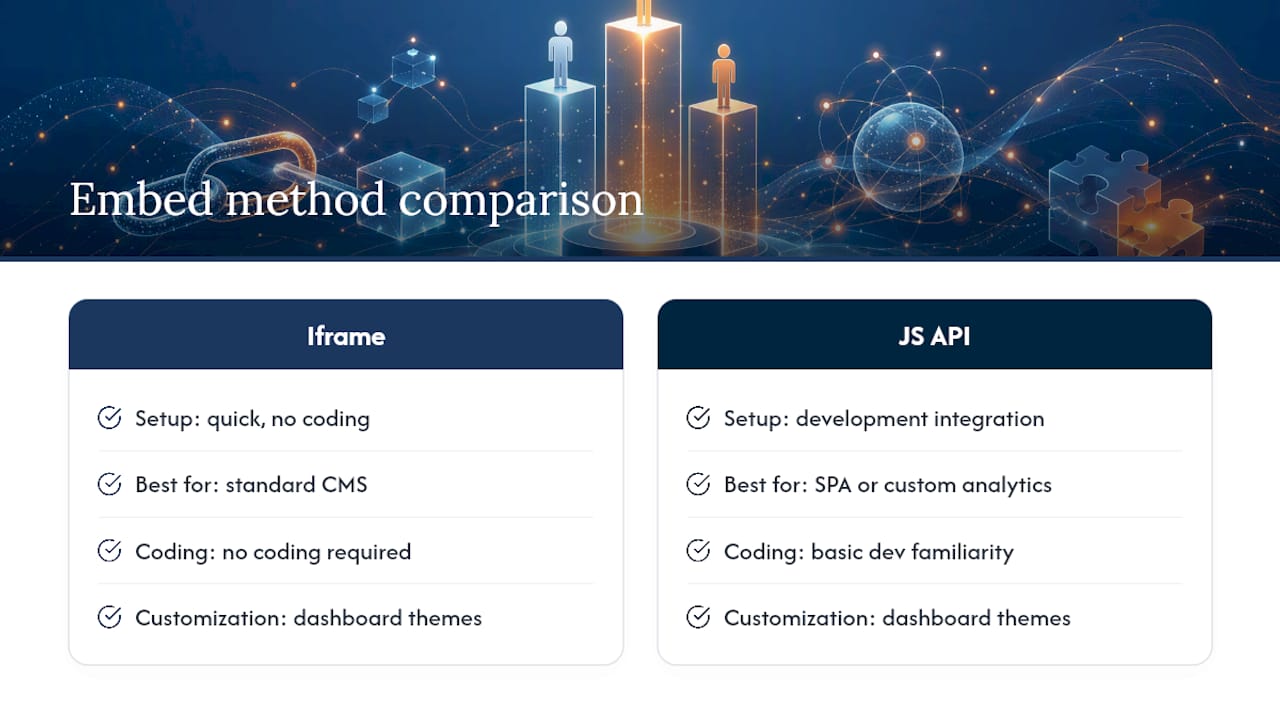
Should You Use an Iframe or a JavaScript API?
Most publishers only need one of two integration paths, and picking the right one up front saves a rebuild later.
Declarative embeds (iframe or data-attribute snippets) are the fastest route. You paste a block like this and you're done:
<iframe src="https://megasports-arena.com/embed/leaderboard/123" width="100%" height="600" loading="lazy" frameborder="0"></iframe>
The loading="lazy" attribute matters more than it looks. It tells the browser to skip loading the iframe until it's near the viewport, which keeps your initial page weight down.
Programmatic JS APIs work better when your site is a single-page application (SPA) or you need tighter control over the widget's lifecycle. Two primary integration methods exist: declarative HTML for simple pages, and JavaScript APIs for advanced control, and the JS route typically follows an "addWidget" style pattern where you call a function with a config object rather than dropping in static markup.
Use the JS API when you need:
- Custom analytics events fired on widget load or interaction
- Dynamic swapping between multiple leaderboards without a page reload
- Tight integration with a React, Vue, or Angular front end
Use the iframe when you're running WordPress, Wix, Squarespace, or any traditional CMS where simplicity beats flexibility.
One security note either way: most providers require domain whitelisting, meaning you register your site's domain in the provider dashboard before the widget will render there at all. Skip this step and you'll get a blank box no matter how correctly you pasted the code.
Will an Embedded Leaderboard Hurt Your Page Speed?
It doesn't have to, but only if you build the embed the right way. Widgets offer a low-friction path to engagement but need to be weighed against Core Web Vitals, since a poorly built one can tank your load times and undo the engagement gain it was supposed to deliver.
A few practices keep the balance in your favor:
- Use a small async loader script. Well-built widget loaders run in the 20 to 80 KB gzipped range, light enough not to compete with your page's core content for bandwidth.
- Lazy-load the iframe or script. Asynchronous loading and lazy-loaded iframes reduce layout shift compared with synchronous embeds, which directly protects your Cumulative Layout Shift (CLS) score.
- Reserve space with a min-height placeholder. Set a fixed minimum height on the container before the widget renders, so content doesn't jump around once the board loads in.
- Preserve your analytics. Route engagement events through
postMessageor your site'sdataLayerinstead of relying on the iframe alone, so clicks and scroll depth still show up in your existing tracking setup. - Don't skip accessibility. Confirm the widget supports keyboard navigation and includes ARIA labels, and build a simple text fallback for visitors with JavaScript disabled.
How Do You Match the Widget to Your Site's Branding?
A leaderboard that looks like it was bolted on from a different website will get ignored. Publishers should prioritize widgets with CSS customization options specifically so the tool blends into the host page instead of standing out as a third-party plugin.
Start with whatever theme options your provider exposes in the dashboard. Most let you adjust:
- Primary and accent colors to match your site palette
- Font family and size for headers and rows
- Visibility toggles for logos, headers, or footer branding
Beyond colors, think about layout. A podium view with player photos reads more like a game and drives more repeat visits; a flat ranked list reads more like a spreadsheet and suits data-dense sports blogs better. Progress bars next to scores add a visual hook that a plain number table lacks.
For responsive sizing, set the container to width: [100%](https://www.w3schools.com/html/html_responsive.asp) with a max width, and let height scale with content, or auto-resize if your provider supports it. Never place other page content inside the widget's container. Most widgets overwrite whatever's already there.
If brand compliance is strict, the JS API gives you more control over the rendered markup than an iframe can. For deeper customization patterns, our guide to gamified leaderboard design covers layout choices that push engagement further.
Why Isn't Your Embedded Leaderboard Showing Up?
Most embed failures trace back to one of five causes, and you can usually diagnose them in under ten minutes.
- Domain not whitelisted. Many providers require you to register your website domain in the dashboard before a widget will render there. If nothing loads at all, this is the first thing to check.
- Blocked requests or CORS errors. Open your browser console (right click, "Inspect") and look for red network errors. A CORS block usually points back to the whitelisting issue above.
- Container overwritten or double-nested. Widgets typically replace everything inside their container element, so make sure that element is empty before the script runs.
- Real-time feed stalled. If the board loads but scores never update, check whether the live connection (SSE or WebSocket) is active, or whether the page is stuck polling an old cached response.
- Stale cache. Clear your CDN or page cache and republish. Some CMS platforms cache HTML blocks aggressively and serve an old version of your snippet.
Why Embeddable Leaderboards Beat Custom Build-Outs
Live leaderboards keep readers on the page longer because there's always a reason to check back: a rank change, a new leader, a score update. Building that from scratch means a data feed, a rendering layer, and ongoing maintenance.
An embeddable widget is usually the smarter call unless your engineering team has spare capacity and a specific reason to own the whole stack. For most sports blogs and partner sites, that reason rarely exists. If you want to go deeper on the tradeoffs, our post on when embedded widgets beat custom APIs breaks down the engineering math in more detail.
Get Your Embed Snippet From Megasports Arena
Megasports Arena gives you a live, brand-matchable leaderboard without writing a data feed or hiring a developer. You get multiple leaderboard formats (ranked list, podium, contest pools), instant score updates, and a copy-paste embed snippet that works whether you're running WordPress, Wix, or a custom-built site.

Start by exploring an active leaderboard in action on the sports rummy leaderboard page, then head to the sports hash game hub to set up your own board and grab your embed code. If you run a local sports blog or community site, pairing your embed with a local schedule tracking guide gives readers two reasons to keep coming back instead of one. Once your board is configured, copy the snippet, paste it into your page, and publish. Your leaderboard will be live in the time it takes to read this sentence twice.
Frequently Asked Questions
Do I need coding experience to embed a leaderboard? No. If you use the iframe snippet, pasting it into a Custom HTML block in WordPress, Wix, or Squarespace requires no coding. The JavaScript API route does require basic development familiarity.
Why does my leaderboard show old scores instead of updating live? This usually means the real-time connection (SSE or WebSocket) isn't active, or your page is serving a cached version of the embed. Clear your cache and confirm the live feed status in your provider dashboard.
Can I change the colors and fonts of an embedded leaderboard? Yes, most providers, including Megasports Arena, offer theme settings in the dashboard for colors, fonts, and header visibility so the widget matches your site design.
Is an iframe or a JavaScript API better for my site? Use an iframe if you're on a standard CMS and want the fastest setup. Use the JavaScript API if your site is a single-page application or you need custom analytics events tied to the widget.
What's the most common reason an embed doesn't appear at all? A domain that hasn't been whitelisted in the provider's dashboard is the single most common cause of a blank or missing embed.
Sources
For hands-on implementation, Sportradar's widget documentation covers the JS API pattern with working code samples. SportMonks' integration guide walks through domain whitelisting step by step.
- How to Embed Live Leaderboards on Your Website
- Widgets getting started
- Betting widgets: publishers’ integration & revenue guide
- Build an embeddable sports picks widget (2026 guide)