
The fastest way to speed up embeds is a two-step default: replace the heavy third-party iframe with a lightweight thumbnail facade, then inject the real player only when the user clicks. Pair that with loading="lazy" on any non-LCP iframes, reserve container space to kill layout shift, and run Cloudinary transforms (q_auto, f_auto, vc_auto) on self-hosted video.
Here's the minimum viable checklist:
- Facade first: Swap YouTube/Vimeo iframes for a thumbnail + play button; inject the real iframe on click.
- Lazy-load non-LCP iframes: Add
loading="lazy"to any embed that sits below the fold. - Reserve space: Set explicit
width/heightoraspect-ratio: 16/9on the container to prevent Cumulative Layout Shift (CLS). - Transform self-hosted video: Use Cloudinary's
q_auto,f_auto, andvc_autoparameters to auto-select quality, format, and codec. - Preconnect for viewport embeds: Add
<link rel="preconnect">for third-party domains when the embed is in the initial viewport. - Measure before and after: Run Lighthouse and WebPageTest to capture LCP, Total Blocking Time (TBT), and payload baselines.
<!-- Minimal facade snippet — YouTube click-to-load -->
<div class="yt-facade" data-videoid="VIDEO_ID"
     style="aspect-ratio:16/9;background:#000;cursor:pointer;"
     role="button" tabindex="0"
     aria-label="Play video">
  <img src="https://i.ytimg.com/vi/VIDEO_ID/hqdefault.jpg"
       alt="Video thumbnail" loading="lazy" width="480" height="270">
</div>
<script>
  document.querySelectorAll('.yt-facade').forEach(el => {
    const activate = () => {
      const id = el.dataset.videoid;
      const iframe = document.createElement('iframe');
      iframe.src = `https://www.youtube.com/embed/${id}?autoplay=1`;
      iframe.allow = 'autoplay; encrypted-media';
      iframe.setAttribute('sandbox',
        'allow-scripts allow-same-origin allow-presentation');

      el.replaceWith(iframe);
    };
    el.addEventListener('click', activate);
    el.addEventListener('keydown', e => {
      if (e.key === 'Enter' || e.key === ' ') activate();
    });
  });
</script>
Pro Tip: Add a <noscript> fallback with a direct YouTube link inside the facade container so users without JavaScript can still reach the video, and search engines can crawl it.
Key Takeaways
The fastest path to better embed performance is a facade pattern combined with deferred script loading, reserved container space, and automated Cloudinary transforms for self-hosted video.
| Point | Details |
|---|---|
| Use a facade by default | Replace third-party iframes with a thumbnail placeholder; inject the real player only on click. |
| Lazy-load below-fold iframes | Add loading="lazy" to non-LCP iframes; never apply it to hero or above-the-fold embeds. |
| Reserve space to prevent CLS | Set aspect-ratio:16/9 or explicit width/height on every embed container before the iframe loads. |
| Transform self-hosted video | Apply q_auto, f_auto, and vc_auto in Cloudinary URLs to cut file size and improve LCP automatically. |
| Measure with Lighthouse and RUM | Capture baseline LCP and TBT before any change; validate real-user impact over 7–14 days after deployment. |
Table of Contents
- Why do standard third-party embeds hurt page performance?
- What is the facade pattern and why does it work so well?
- How to build a click-to-load YouTube embed from scratch
- When should you use a library or CMS plugin instead?
- How do you optimize self-hosted video with Cloudinary?
- When should you NOT lazy-load an embed?
- How do you measure embed performance improvements?
- Quick-reference checklist: wins to add and mistakes to avoid
- What the research actually says about embed performance
- When performance optimization should take a back seat
- Sources
Why do standard third-party embeds hurt page performance?
A standard YouTube embed is not just a video. It pulls in an HTML document, multiple CSS files, several JavaScript bundles, and makes DNS lookups to a handful of Google domains before a single frame of video plays. According to Web, embed scripts commonly range from roughly 100KB to multiple megabytes and execute on the main thread at page load, blocking rendering for everything else on the page.
The measurable damage shows up in several places:
- Slower LCP and FCP: The browser can't paint the largest content element until embed scripts finish executing.
- Higher Total Blocking Time: Main-thread JS from the embed competes with your own code.
- Increased INP/FID: User interactions feel sluggish while embed scripts run.
- Extra DNS and TCP overhead: YouTube alone requires connections to
youtube.com,ytimg.com,googlevideo.com, andgoogleapis.com. - Bandwidth and battery drain: Mobile users on throttled networks pay the full cost of every byte the embed loads, even if they never press play.
Microsoft Edge's team has flagged this at the browser level too. Their Document Policy proposal would let pages block embeds that violate performance budgets, which signals how seriously browser vendors now treat embed overhead.
What is the facade pattern and why does it work so well?
The facade pattern replaces a heavy third-party embed with a static placeholder that looks identical: a thumbnail image and a play button. The real iframe and its scripts load only when the user signals intent by clicking or tapping. The browser never fetches the embed's JavaScript until it's actually needed.

Why it works: The browser skips all DNS lookups, TCP connections, and script execution for the embed on initial page load. Perceived performance improves immediately because the thumbnail renders in milliseconds.
Trade-offs worth knowing:
- Pro: Dramatic reduction in initial network requests and main-thread blocking time.
- Pro: Works across all browsers with no framework dependency.
- Con: Requires a small amount of JavaScript to wire up the click handler.
- Con: Autoplay-on-scroll behavior is lost unless you add an IntersectionObserver trigger.
- Con: Users see a slight delay between click and playback while the iframe loads.
A practical guide on lite embeds showed that switching from standard YouTube iframes to lightweight placeholder facades produced significant PageSpeed score improvements in real demos, with the gains scaling up as the number of embeds per page increases.
Pro Tip: Always add role="button", tabindex="0", and an aria-label to the facade container, plus a keydown handler for Enter and Space. Screen readers and keyboard users need the same access as mouse users.
How to build a click-to-load YouTube embed from scratch
This section gives you a complete, copy-paste implementation with IntersectionObserver support, keyboard accessibility, and CLS prevention baked in.
Step-by-step implementation
- Mark up the facade container with a
data-videoidattribute, explicit dimensions, and ARIA attributes. - Add the thumbnail using YouTube's
hqdefault.jpgURL pattern withloading="lazy". - Wire the click handler to replace the facade with a real iframe on activation.
- Add keyboard support with a
keydownlistener for Enter and Space. - Add an IntersectionObserver to auto-load the iframe when the facade enters the viewport (optional, for below-fold embeds you want to preload silently).
- Set
sandboxattributes on the injected iframe to restrict what the embed can do.
<!-- Reserve space with aspect-ratio to prevent CLS -->
<style>
  .yt-facade { position:relative; aspect-ratio:16/9;
               background:#111; overflow:hidden; }

  .yt-facade .play-btn {

    width:68px; height:48px;
    background:rgba(255,0,0,.85); border-radius:12px;
    pointer-events:none;
  }
</style>

<div class="yt-facade" data-videoid="VIDEO_ID"
     role="button" tabindex="0"
     aria-label="Play: Your Video Title">
  <img src="https://i.ytimg.com/vi/VIDEO_ID/hqdefault.jpg"
       alt="Video thumbnail" width="480" height="270">
  <div class="play-btn" aria-hidden="true"></div>
</div>
<noscript>
  <a href="https://www.youtube.com/watch?v=VIDEO_ID">Watch on YouTube</a>
</noscript>
function activateFacade(el) {
  const id = el.dataset.videoid;
  const iframe = document.createElement('iframe');
  iframe.src = `https://www.youtube.com/embed/${id}?autoplay=1`;
  iframe.allow = 'autoplay; encrypted-media; picture-in-picture';
  iframe.setAttribute('sandbox',
    'allow-scripts allow-same-origin allow-presentation allow-popups');

  el.replaceWith(iframe);
}

document.querySelectorAll('.yt-facade').forEach(el => {
  el.addEventListener('click', () => activateFacade(el));
  el.addEventListener('keydown', e => {
    if (e.key === 'Enter' || e.key === ' ') {
      e.preventDefault();
      activateFacade(el);
    }
  });
});
Key points on the implementation:
- CLS prevention:
aspect-ratio:16/9on the container reserves the exact space the iframe will occupy. No layout jump when the iframe loads. sandboxattribute: Restricts the embedded content to only what it needs. Dropallow-same-originif you don't need cross-origin storage access.srcdocalternative: For simple embeds, you can usesrcdocon the iframe to inline minimal HTML and avoid a full network round-trip for the initial document.
Failing to reserve space for an embed container is the single most common cause of CLS with iframes. A container that collapses to zero height before the iframe loads will shift every element below it the moment the iframe renders.
For pages with dozens of embeds, loading all of them at once is a trap. One developer reduced visible load time from over 10 seconds to under 3 seconds by loading an initial batch eagerly and then progressively loading additional embeds in the background as the user scrolled.
When should you use a library or CMS plugin instead?
Hand-rolling a facade is the right call for custom builds. For everything else, existing tools save time and handle edge cases you'd otherwise miss.
lite-youtube-embed
Install via npm (npm install lite-youtube-embed) or CDN, then replace <iframe> tags with <lite-youtube videoid="VIDEO_ID">. The custom element handles the thumbnail, play button, and iframe injection automatically. It also supports <lite-youtube-embed> with a params attribute for player options.
- Works in any framework or plain HTML.
- Degrades gracefully with a
<a>fallback. - Roughly 1KB of JavaScript after gzip.
WordPress Embed Optimizer
The Embed Optimizer plugin lazy-loads embeds using IntersectionObserver, adds dns-prefetch for known embed domains when the embed is in the initial viewport, and records embed dimensions to reserve container space and reduce layout shift. It pairs with the Optimization Detective plugin to avoid misapplied lazy loading for above-the-fold embeds.
Configuration notes:
- Install Embed Optimizer and Optimization Detective from the WordPress plugin directory.
- No manual configuration needed for most sites; the plugin detects embed positions automatically.
- Avoid manually forcing
loading="lazy"on hero embeds — the plugin's heuristics handle that correctly.
The Enhanced Embed Block plugin takes a different approach: it uses lite-youtube and lite-vimeo custom elements, loads thumbnails until play, and degrades to a plain link when JavaScript is disabled, which also improves privacy by avoiding third-party cookies until the user opts in.
NitroPack
NitroPack is an all-in-one performance platform that handles embed deferral, script optimization, image compression, and CDN delivery from a single dashboard. The trade-off is real: you get near-zero-effort gains, but you're dependent on their infrastructure and pricing. For high-traffic WordPress or WooCommerce sites where developer time is expensive, that trade-off often makes sense. For a lean custom build, the vendor lock-in usually isn't worth it.
How do you optimize self-hosted video with Cloudinary?
Self-hosted video gives you full control over delivery, but only if you use it. Uploading a raw MP4 and serving it directly is often slower than a YouTube embed. Cloudinary's transformation pipeline changes that.
Three parameters do most of the work:
q_auto: Automatically selects the optimal quality level per device and network, reducing file size without visible quality loss.f_auto: Serves the best format the browser supports: AV1, VP9, or H.264, without you encoding multiple versions manually.vc_auto: Chooses the video codec automatically, complementingf_autofor broader device coverage.
A Cloudinary case study showed notable file-size reductions using automated transforms, with substantial LCP and Lighthouse score improvements. A separate Cloudinary performance test reported up to ~67% reduction in video load time, ~45% LCP improvement, and ~52% bandwidth savings for a full optimization stack.
Sample transformed Cloudinary URL:
https://res.cloudinary.com/YOUR_CLOUD/video/upload/q_auto,f_auto,vc_auto/your-video.mp4
Sample <video> markup:
<video width="1280" height="720"
       preload="metadata"
       poster="https://res.cloudinary.com/YOUR_CLOUD/image/upload/q_auto,f_auto/poster.jpg"
       controls>
  <source src="https://res.cloudinary.com/YOUR_CLOUD/video/upload/q_auto,f_auto,vc_auto/your-video.mp4"
          type="video/mp4">
</video>
preload="metadata" tells the browser to fetch only the video duration and dimensions on load, not the full file. The poster attribute shows a Cloudinary-optimized image while the video is idle.
| Metric | Baseline (raw MP4) | Optimized (q_auto, f_auto, vc_auto) |
|---|---|---|
| File size | ~38MB | Under 15MB |
| Video load time | Baseline | Up to ~67% faster |
| LCP improvement | Baseline | Up to ~45% better |
| Bandwidth savings | Baseline | Up to ~52% less |
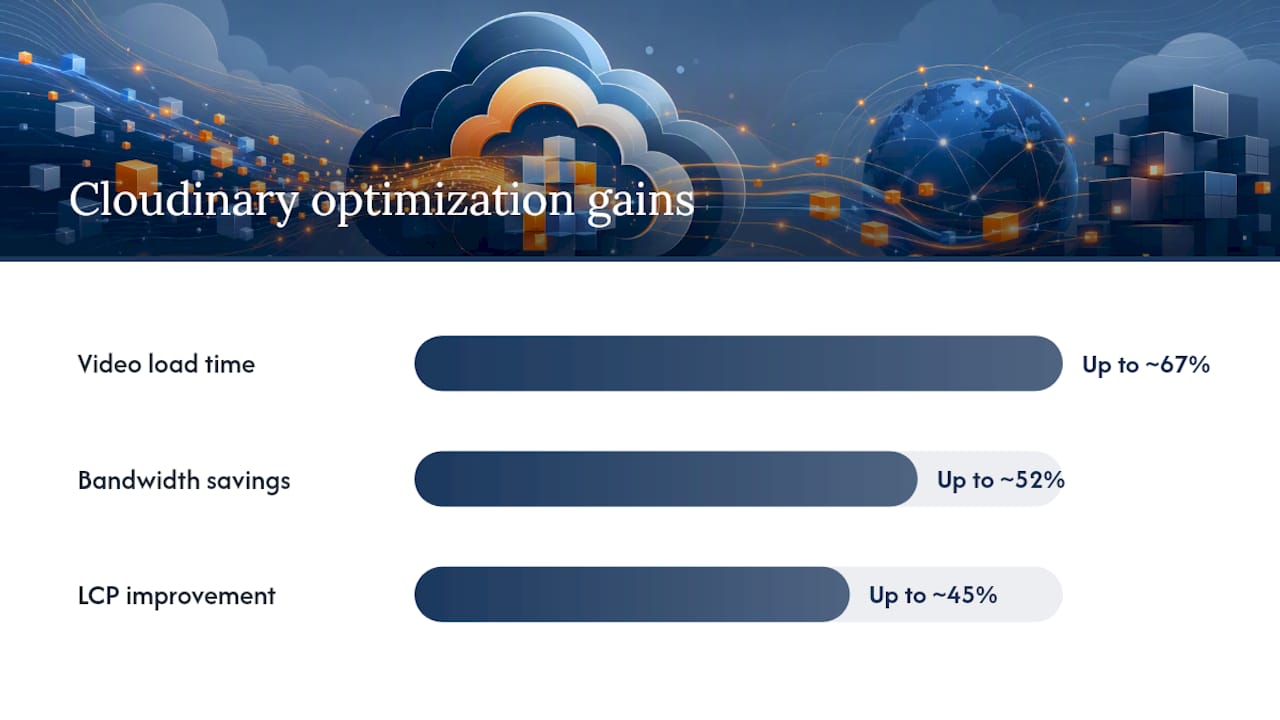
Source: Cloudinary measured test results. Actual gains vary by source file, network, and device.
For long-form video (over 5 minutes), adaptive bitrate streaming via Cloudinary's HLS or DASH delivery matters more than static transforms alone, since it adjusts quality dynamically to the viewer's connection speed.
When should you NOT lazy-load an embed?
Lazy-loading is the right default for below-fold content. Apply it to an LCP-critical embed and you've just told the browser to deprioritize the most important element on the page.
Decision rule: If the embed is the largest visible element in the initial viewport, treat it as LCP-critical. Use eager loading, preconnect, or an optimized self-hosted asset instead of loading="lazy".
For initial-viewport third-party embeds, add dns-prefetch and preconnect to reduce connection overhead:
<!-- For YouTube embeds in the initial viewport -->
<link rel="dns-prefetch" href="https://www.youtube.com">
<link rel="preconnect" href="https://i.ytimg.com" crossorigin>

<!-- Preload the poster image if it's the LCP element -->
<link rel="preload" as="image"
      href="https://i.ytimg.com/vi/VIDEO_ID/hqdefault.jpg">
MDN documents rel=preload and rel=preconnect as the standard tools for controlling resource priority and reducing DNS/TCP/SSL overhead for third-party hosts.
Quick decision checklist:
- Is the embed visible without scrolling? Use eager load + preconnect.
- Is the embed the LCP candidate? Preload the poster image; avoid
loading="lazy". - Is the embed below the fold? Add
loading="lazy"and let IntersectionObserver handle the rest. - Are there more than 5 embeds on the page? Use a batching strategy; don't load all at once.
How do you measure embed performance improvements?
Measuring before you change anything is non-negotiable. Without a baseline, you can't tell whether your facade implementation actually moved the needle.
Primary tools:
- Lighthouse (Chrome DevTools or CLI): Lab data for LCP, TBT, CLS, and overall performance score. Run it on a throttled mobile preset for realistic numbers.
- WebPageTest: Filmstrip view shows exactly when the embed appears visually. Use the "repeat view" to separate cached vs. cold-load performance.
- Real User Monitoring (RUM): Chrome's
web-vitalslibrary or a third-party RUM tool captures actual LCP and INP from real visitors. Lab data and real data often diverge significantly.
Test checklist:
- Record baseline Lighthouse scores and WebPageTest filmstrip on the unmodified page.
- Implement the facade or lazy-load change on a staging environment.
- Run Lighthouse and WebPageTest again; compare LCP, TBT, and payload size.
- Deploy to production with a staged rollout (10–20% of traffic first).
- Monitor RUM data for 7–14 days to confirm real-user LCP and INP improvements.
Ranges drawn from Cloudinary case studies and the 81-iframe batching case study. Your results will vary.
Quick-reference checklist: wins to add and mistakes to avoid
Quick wins:
- Add a facade for every third-party video player (YouTube, Vimeo, Wistia).
- Set
loading="lazy"on all iframes that are not in the initial viewport. - Add
<link rel="preconnect">for embed domains that appear in the initial viewport. - Reserve container space with
aspect-ratioor explicitwidth/heighton every embed wrapper. - Apply
q_auto,f_auto, andvc_autoto all Cloudinary-hosted video assets. - Add
sandboxattributes to injected iframes to limit their permissions.
Anti-patterns to stop doing:
- Blindly adding
loading="lazy"to hero or above-the-fold embeds. - Inlining the full YouTube or Vimeo player script in your page
<head>. - Loading 20+ iframes simultaneously on a single page without batching.
- Skipping mobile throttled network tests — desktop Lighthouse scores hide the real cost.
- Forgetting
noscriptfallbacks, which breaks SEO crawlability and accessibility.
What the research actually says about embed performance
The authoritative sources on this topic converge on a few consistent findings worth keeping close:
- Web: The primary cost of most embeds is JavaScript, not the media file. Deferring that JS until user intent preserves main-thread capacity for critical rendering tasks.
- Cloudinary optimization case study: Automated transforms (
q_auto,f_auto,vc_auto) reduced a test file from 38MB to under 15MB with no manual encoding work. - Cloudinary load time test: A full optimization stack produced up to ~67% faster video load times and ~52% bandwidth savings in measured tests.
- WordPress Embed Optimizer: Handles lazy-loading, preconnect, and space reservation automatically, with heuristics to avoid misapplied lazy-loading for initial-viewport embeds.
- MDN rel=preload: Documents the correct usage of
preloadandpreconnectfor controlling resource priority. - Microsoft Edge Document Policy: Browser vendors are actively exploring standardized controls to block embeds that violate performance budgets, signaling that embed overhead is a platform-level concern, not just a developer concern.
The pattern across all of these is consistent: defer the JavaScript, reserve the space, and measure with real users.
When performance optimization should take a back seat
The facade pattern is almost always the right technical call. Whether it's the right product call depends on what the page is actually for.
A marketing landing page with a hero video that needs to play immediately on load is a case where autoplay and instant playback matter more than shaving 200ms off LCP. Forcing a facade there adds friction at exactly the wrong moment. On the other hand, a content page with six embedded videos that most users never watch is exactly where deferred loading pays off, because you're not penalizing the page for content the user may never interact with.
The practical split: prioritize LCP-critical pages first, since those are where Core Web Vitals scores and real user experience intersect most directly. Use facades on content-heavy pages with multiple embeds. Invest in adaptive streaming only for long-form video where users actually watch past the first minute.
One thing the performance community underestimates: the facade pattern has a UX cost that compounds on mobile. On a slow connection, the gap between clicking the play button and seeing the first frame of video can feel long enough to make users wonder if their tap registered. A well-designed loading indicator inside the facade container closes that gap without sacrificing the performance win.
Sources
- Embed best practices
- Embed Optimizer — WordPress plugin
- Speeding Up Centered Part 1: 81 <iframe> Embeds