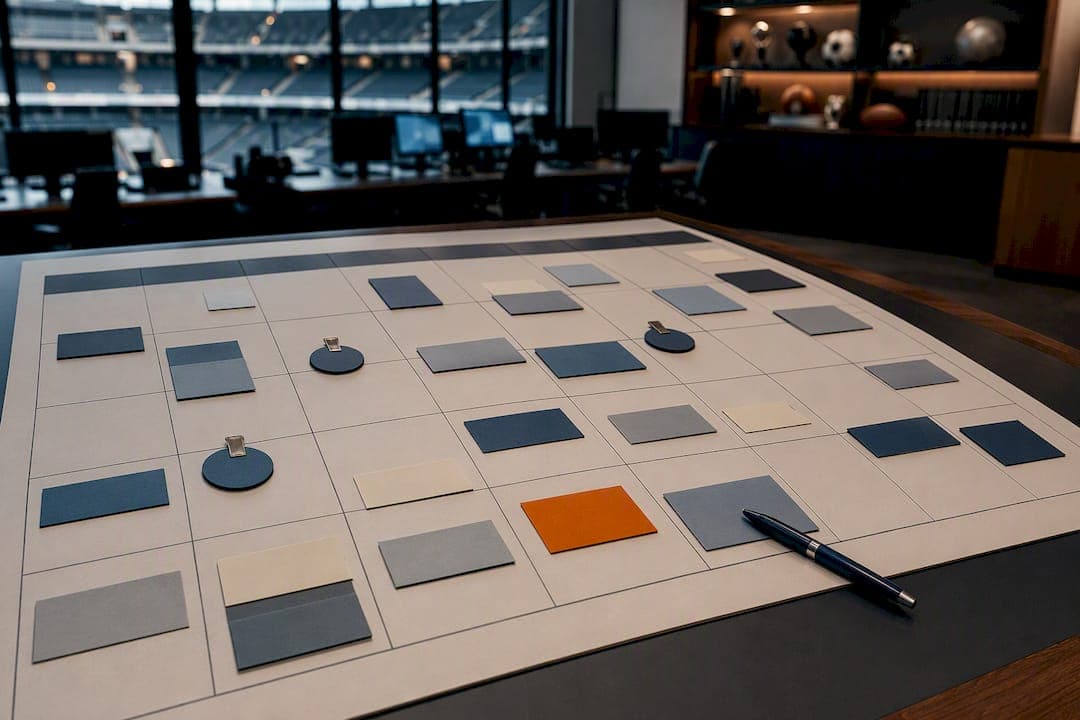
A working contest calendar typically includes several planned campaign windows plus a few opportunistic slots, each with a named owner and a production deadline attached. Build it in a shared 12-month view, flag your top 8 tentpole sporting events first, then fill in the gaps. From there, the fastest first move is embedding a ready-made resource like Megasports Arena's game library so you're publishing contests while the rest of your calendar takes shape.
TL;DR:
- Reserving 20 to 30 percent of contest capacity for opportunistic slots allows quick reaction to trending moments without disrupting planned campaigns.
- Space core campaigns four to six weeks apart and vary incentive types to prevent fan fatigue and maintain engagement levels over the year.
- Embedding ready-made contest tools, such as widgets from Megasports Arena, enables rapid deployment and testing without extensive development work.
- Lock creative assets at least four weeks before launch and thoroughly test embed functionality, especially time zone and consent settings, before going live.
- Tracking key metrics like DAU/MAU ratio, cohort retention, and weekly visits quarterly helps optimize campaign spacing and prioritize formats that boost user retention.
Table of Contents
- What Belongs on a Contest Calendar?
- How Do You Build a Contest Calendar From Scratch?
- Cadence, Spacing, and Fan Fatigue
- Making Contests Easy for Partner Sites to Embed
- Which Sporting Events Deserve a Slot on Your Calendar?
- Templates and Tools to Get Your Calendar Running
- From Announcement to Post-Contest Wrap-Up: A Real Timeline
- Where Contest Calendars Usually Go Wrong
- Tracking Performance and Refining the Calendar Over Time
- Getting the Word Out to Users and Partners
- Keeping Every Embedded Calendar in Sync
- Treat the Calendar Like a Product, Not a To-Do List
- How Megasports Arena Fits Into Your Calendar
- Sources
- FAQ
What Belongs on a Contest Calendar?
A calendar that's just a list of dates is a liability. Every entry needs eight fields to actually function: the tentpole event, its priority tier, the date window, the creative due date, an assigned owner, a link to assets, the activation rule, and the measurement window that tells you if it worked.
A core campaign structure with multiple planned campaigns helps keep a production team from burning out while still leaving room to react. Industry guidance on building an annual campaign calendar backs this exact split, plus reserving 2 to 3 opportunistic slots for whatever the season throws at you, like a surprise playoff run or a viral moment you didn't see coming.
Where you store this matters almost as much as what's in it:
- Shared spreadsheet for the planning phase, where multiple stakeholders edit fields and leave comments.
- Google Calendar once dates are locked, for a publish-ready view partners and internal teams can subscribe to.
- CSV export when you need to feed dates directly into a CMS or scheduling tool.
Keep the planning version messy and collaborative. Keep the published version clean.
How Do You Build a Contest Calendar From Scratch?
Start with data, not guesswork. Pull last year's peak traffic days and cross-reference them against platform engagement metrics like DAU/MAU ratio and prior campaign ROI. That tells you which events actually moved numbers for your audience versus which ones just looked good on a sports calendar.
- Map your peaks. Identify the 10 to 12 candidate windows where historical traffic or engagement spiked.
- Cut to 6 to 8 core campaigns. Assign priority tiers, and put roughly 60% of your promotional budget behind the top 2 or 3.
- Backward-schedule from launch. Work in fixed milestones: T-8 weeks to finalize the contest offer, T-6 weeks for the affiliate or partner brief, T-4 weeks for creative sign-off, T-2 weeks for asset delivery, T-0 for go-live.
- Reserve 2 to 3 opportunistic slots. Define in advance what triggers one (a surprise matchup, a trending storyline) and cap the budget so it can't cannibalize a planned campaign.
- Assign owners and a launch-day contact. Someone needs to be reachable if the leaderboard breaks at kickoff.
This backward-scheduling approach mirrors what operators call hardening milestones, and the daily fantasy sports operator playbook treats the gap between T-8 and T-0 as the real difference between a program that scrambles every launch and one that doesn't.
Pro Tip: Put your on-call contact's name directly on the calendar entry, not in a separate document. When a leaderboard glitches during the fourth quarter of a playoff game, nobody has time to go hunting for a Slack channel.
Cadence, Spacing, and Fan Fatigue
Space your core campaigns 4 to 6 weeks apart. Closer than that, and both your affiliates and your players start tuning out the promotions, according to guidance on annual campaign calendar construction. Rotate the incentive type too. If every contest offers the same prize structure, the novelty wears off fast even when the sport changes.
Marquee campaigns shouldn't carry the whole calendar alone. Fill the gaps between them with lightweight, recurring formats:
- Daily prediction polls tied to that night's games.
- Weekly mini-contests with a quick entry and same-day results.
- Short trivia rounds during slow news weeks.
A mini-games retention playbook found that a phased rollout, one daily game in week one, a weekly quiz by week three, can go live within just 1 to 4 weeks and still produce a measurable retention bump.
Track three numbers to know if your cadence is working: DAU/MAU ratio, cohort lift from campaign to campaign, and recurring visits per week. Review these quarterly and adjust spacing rather than waiting for an annual postmortem.
One legal note worth building into your process now: prize value thresholds and sweepstakes rules vary by U.S. state, and some jurisdictions require specific disclosures once a prize crosses a certain dollar value. Confirm the threshold for every state where you operate before locking a prize structure into the calendar.
Making Contests Easy for Partner Sites to Embed
Partners won't run your contest if implementation eats their dev sprint. Four embed patterns cover most needs, and each trades off differently:
- Iframe or widget embed is the fastest to implement but offers the least styling control.
- API-driven contest card gives partners full design flexibility but requires engineering time on their end.
- CMS scheduling hook lets editorial teams schedule contest appearances like any other content block.
- Leaderboard iframe is a low-effort way to show live standings without building anything custom.
Beyond the technical embed, partners need an editorial kit ready before launch day: one line of promo copy, a graphic banner sized for their site, a landing page URL, and email or social templates they can drop straight into their own send calendar. A creative asset checklist built around this exact T-6 to T-4 week window keeps affiliates from scrambling at the last minute.
Three operational checks matter more than they get credit for: normalize time zones so a "start at noon" contest doesn't confuse half your audience, cut signup friction with one-click entry for already-logged-in users, and confirm privacy and consent flags plus analytics hooks fire correctly before the contest goes live.
Pro Tip: Test the embed on a partner's actual staging site, not a sandbox. Timezone bugs and consent-flag failures almost never show up until real traffic hits real infrastructure.
Which Sporting Events Deserve a Slot on Your Calendar?
Not every game deserves a campaign. A handful of tentpole windows consistently outperform everything else because they draw casual fans alongside your core audience:
- Super Bowl — the single highest-traffic day for casual sports engagement all year.
- March Madness — bracket-driven contests convert non-fans into daily visitors for three straight weeks.
- NFL season kickoff — sets the tone and the habit loop for the entire fall.
- MLB Opening Day — a reliable spring reset point after a slower contest season.
- World Cup and major international tournaments — massive spikes, but only every few years, so treat them as opportunistic-tier when they don't fall on your calendar year.
Retail tie-ins amplify all of these. Pairing an in-app prediction contest or bingo game with a watch party or in-store activation turns passive attendees into active participants, a pattern the 2026 sports promotion calendar research documents directly.
Slot logic follows the same tier and budget rules from your core calendar: top-tier events get the longest creative lead time and the biggest budget share, while smaller tentpoles run leaner.
Templates and Tools to Get Your Calendar Running
Your template only needs eight columns, but they need to be the right eight: event name, start and end date, tier, creative due date, owner, assets link, activation rule, and the measurement metric you'll use to judge success.
For distribution, three formats cover almost every use case:
- Google Calendar with public embed for a clean, subscribable view partners can add to their own scheduling tools.
- CSV export for direct import into a CMS or scheduling platform.
- Trello or Jira board for tracking production tasks against your T-8 through T-0 milestones.
| Field | Purpose | Example |
|---|---|---|
| Event | Names the tentpole or opportunistic slot | Super Bowl LX |
| Tier | Sets budget and creative priority | Tier 1 |
| Creative Due | Locks the T-4 week deadline | 4 weeks before launch |
| Measurement Metric | Defines success | DAU uplift, session length |
Megasports Arena's Sports Rummy hub and its embeddable game pages fit directly into the "assets link" column for partners who don't want to build a contest widget from scratch. It's a shortcut for the production step, not a replacement for the planning above it.
From Announcement to Post-Contest Wrap-Up: A Real Timeline
Here's how a single tier-1 campaign actually moves through the calendar over roughly ten weeks.
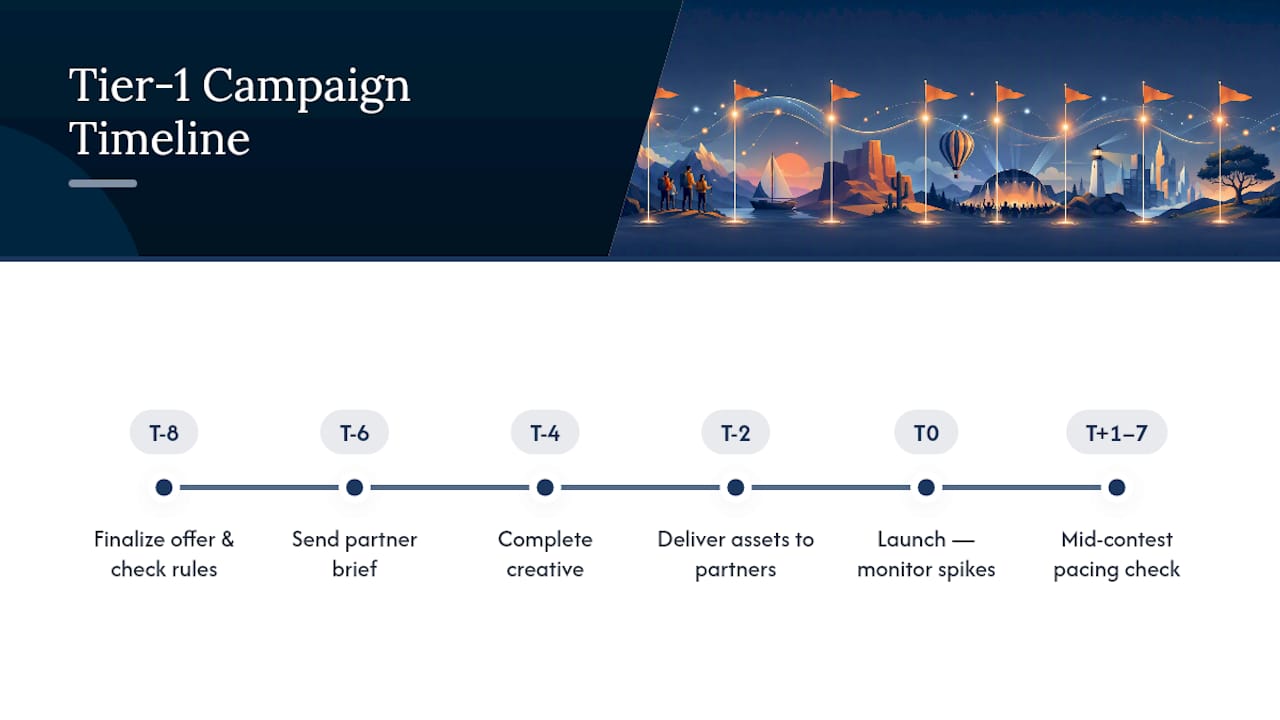
T-8 weeks: The offer gets finalized. What's the prize, what's the entry mechanic, what sport and matchup does it tie to? This is also when you check prize-value thresholds against state rules.
T-6 weeks: The partner brief goes out. Affiliates and embedding sites get the contest concept, target dates, and a first look at expected assets.
T-4 weeks: Creative is complete. Banners, landing page copy, and email templates are locked, matching the production timeline window that keeps affiliates from scrambling later.
T-2 weeks: Assets ship to every partner embedding the contest. This is the last checkpoint to catch a broken link or a timezone error before launch.
T-0, launch day: The contest goes live. Your on-call contact monitors leaderboard performance and signup flow for the first few hours, when traffic spikes hardest.
T+1 to T+7 days: Mid-contest check. Are entries pacing where you expected? If not, this is your window to boost promotion without disrupting the next scheduled campaign.
Post-contest, week following close: Results get published, winners notified, and disputes resolved against your published rules. Publishing dated deadlines with a specific date, time, and time zone before the contest starts, a practice detailed in the Fantasy League Commissioner Guide, heads off most disputes before they start.
Two weeks later: A short retro against your measurement metric feeds directly into planning the next tier-1 slot.
Where Contest Calendars Usually Go Wrong
The most common failure isn't a bad idea. It's a calendar built with no slack. Teams plan 8 core campaigns and then get surprised when a real opportunistic moment, an upset, a trending storyline, has no budget or creative bandwidth left to react to it. Reserving 20 to 30% of your capacity specifically for opportunistic slots, as the daily fantasy sports operator playbook recommends, is the fix, but it only works if that capacity is actually protected rather than quietly absorbed by scope creep on planned campaigns.
Timezone errors are the second most frequent problem, and they're almost always avoidable. A contest listed as starting "at 8 PM" without a specified zone will confuse a meaningful share of your audience, especially for national campaigns spanning multiple regions. Every calendar entry needs an explicit time zone, not an assumed one.
Rule ambiguity causes the third major category of trouble. If your entry deadline, scoring method, or tiebreaker isn't published and dated before the contest opens, expect disputes, and expect them to be hard to resolve fairly after the fact. A precedent log documenting how past edge cases got resolved, a practice borrowed from fantasy league governance, gives you a consistent standard to point to instead of relitigating each dispute from scratch.
Finally, watch for campaign crowding. Two tier-1 campaigns launching within days of each other split attention and dilute both. The 4 to 6 week spacing rule exists precisely to prevent this, and it's the first thing to check when a well-planned campaign underperforms for no obvious reason.
Tracking Performance and Refining the Calendar Over Time
Three metrics tell you almost everything you need to know about whether your calendar is working: DAU/MAU ratio, cohort retention lift, and recurring visits per week. Watch how each shifts in the two weeks following a campaign launch, not just on launch day itself.
Cohort lift matters more than raw traffic. A campaign that draws a huge one-day spike but no repeat visits the following week hasn't built anything durable. Compare the cohort that entered a specific contest against your baseline user base over the following 30 days to see whether the campaign actually created habit, not just a momentary bump.
Quarterly review cycles work better than annual ones for this kind of calendar. Sports seasons compress a full year of variance into three or four distinct windows, so a quarterly check lets you catch a spacing problem or a fatigued incentive type before it repeats across an entire season. Feed the results directly back into your next quarter's tier assignments. If a tier-2 campaign consistently outperforms a tier-1 slot, move the budget.
Community-format features, daily polls and short mini-contests, are worth measuring separately from marquee campaigns. A community-driven contests playbook documents DAU uplifts in the 10 to 25% range for participants in these lightweight formats, and they're launchable within a 2 to 12 week window. That makes them a fast, low-risk way to test whether a new format resonates before committing tier-1 budget to it. Treat quarterly reviews as the moment to decide which of these smaller experiments earned a permanent slot on the calendar.
Getting the Word Out to Users and Partners
A contest nobody hears about doesn't matter how well it's scheduled. Build your communication plan around three audiences, each on a slightly different timeline.
Internal teams need the calendar itself, published and updated, at least 8 weeks before each core campaign so content, design, and support can plan around it. A shared calendar with clear owners avoids the classic problem of marketing launching a promotion that support didn't know was coming.
Partner sites need their brief at T-6 weeks, as outlined earlier, followed by a check-in at T-2 weeks to confirm assets landed and embeds are tested. A short email template works better here than a lengthy document. Busy partner teams respond to something they can act on in five minutes.
Players and end users need a layered approach: a teaser a week before launch, a launch-day push across email and social, and a mid-contest reminder for anyone who hasn't entered yet. Personalization helps here specifically, "favorite team" framing on contest promotion has been shown to convert casual visitors into habitual players more effectively than generic promotion, a pattern documented in 2026 sports promotion planning research.
Don't forget the post-contest message. Announcing winners and thanking participants, even briefly, closes the loop and sets up the next campaign's opening message. Skipping this step is a quiet way to lose the habitual players you worked to build.
Keeping Every Embedded Calendar in Sync
The moment your contest calendar lives on more than one site, synchronization becomes a real operational risk. A date change made in your master calendar needs to propagate everywhere that calendar appears, or you end up with a partner site advertising a contest that closed yesterday.

The safest structure is a single source of truth, typically the master spreadsheet or Google Calendar, feeding every embed through API or scheduled export rather than manual copy-paste. Manual updates across multiple partner sites are where sync failures happen most often, usually because one site gets updated and three others don't.
Build in a change-notification step whenever a date shifts. A short automated alert to every partner embedding that specific contest, even a simple email trigger, prevents the awkward situation where a player enters a contest through a partner site using outdated rules or dates.
Time zone normalization deserves a second mention here specifically because sync issues compound it. If your master calendar stores times in one zone but a partner's CMS displays local time without conversion, the discrepancy shows up differently on every embedded site. Standardize on UTC in your backend data and convert for display, rather than storing local time as your source of truth.
Finally, version your calendar exports. When a partner asks why their embedded contest doesn't match what you show internally, being able to point to exactly when a change went out, and confirm whether their embed pulled the update, turns a support headache into a five-minute fix.
Treat the Calendar Like a Product, Not a To-Do List
The biggest shift in mindset that separates a reactive promotions team from a program that compounds over time is simple: stop treating the contest calendar as a scheduling document and start treating it as a product with its own roadmap.
That means protecting production timelines the same way a software team protects a release date, reserving capacity rather than letting it get absorbed by whatever feels urgent that week, and reviewing performance on a fixed quarterly cadence instead of only after something goes wrong.
Start small. A daily poll or a lightweight mini-contest tells you fast whether a format resonates before you commit tier-1 budget to it. Scale only what actually moves your retention numbers, and keep a precedent log of rulings and edge cases so next season's rules build on this season's lessons instead of repeating the same disputes.
— peter
How Megasports Arena Fits Into Your Calendar
Once your calendar has core campaign windows and opportunistic slots mapped out, the next question is what actually fills those slots without draining your production budget. Some platforms provide partner sites with an embeddable library of fantasy and prediction games, leaderboard widgets, and a running sports calendar, enabling sites to plug in ready-made content instead of building a contest engine from scratch.

A practical way to start: embed a daily poll widget alongside one weekly marquee contest from the Free Fantasy Football Hub for a single month, then measure the DAU and average session-length change against your baseline. That's a small enough test to run without disrupting your existing calendar, and it gives you real numbers before you commit a tier-1 slot to it. Support for partner briefs and templated assets can cover the T-6 week handoff step that most teams struggle to staff.
If you're ready to see what an embed actually looks like on a live page, preview the flow on the Sports Rummy play page and check the leaderboard mechanics before slotting it into your own calendar.
Sources
- Building an annual campaign calendar
- 2026 Sports Promotion Calendar and Planning
- Mini-games retention playbook
- Fantasy League Commissioner Guide: How to Run a League the Right Way
FAQ
How Many Campaigns Should a Contest Calendar Include?
Plan for 6 to 8 core campaigns per year, plus 2 to 3 opportunistic slots reserved for market-driven moments you can't predict months out.
How Far Apart Should Contests Be Spaced?
Space major campaigns 4 to 6 weeks apart and rotate incentive types between them to avoid fatiguing both affiliates and players.
What's the Fastest Way to Start Embedding Contests?
Embedding an existing widget, like the game and leaderboard modules available through Megasports Arena, gets a contest live in days rather than the weeks a custom build requires.
How Early Should Creative Assets Be Finalized?
Lock creative by T-4 weeks before launch, following the affiliate brief at T-6 weeks, so partners have time to test embeds before go-live.
What Metrics Show Whether a Contest Calendar Is Working?
Track DAU/MAU ratio, cohort retention lift, and recurring visits per week, then review the numbers quarterly to refine tier assignments and spacing.