
Yes, sports contests grow email lists, but only when you gate them at the right moment. Soft-gating a quiz or bracket right before the results screen, instead of putting a form at the front door, is what separates a contest that fills your list from one that just entertains visitors for free. The move to make today: launch a 6 to 10 question mobile quiz or a 16 team bracket, and put the email field between the last question and the payoff.
TL;DR:
- Placing the email gate at the contest results or final submission increases conversion rates, often reaching around 30 percent or higher.
- Running a bracket contest with rounds every three to five days sustains engagement and collects multiple email addresses over several weeks.
- Shortening quizzes to 60 to 90 seconds and optimizing load times are key to maximizing completion and capture rates on mobile devices.
- Seed contests with existing fans and use share cards to expand reach organically, complemented by paid promotion to lookalike audiences.
- Building long-term series tied to game schedules and using embeddable contest platforms supports ongoing audience retention and reduces development time.
Table of Contents
- How Contests Grow Email Lists for Sports Publishers
- Quick-Play Tactics: Pick One Format That Scales Signups
- Designing the Contest: UX, Timing, and Prize Fit
- Where Should You Place the Email Gate?
- Distribution: Seeding Entrants and Getting Shares
- Turning Contest Behavior Into Subscriber Segments
- What Numbers Should You Track and Target?
- Publisher Perspective: Building a Season-Long Program
- Launch Faster With Megasports Arena's Embed-Ready Games
- Sources
- FAQ
How Contests Grow Email Lists for Sports Publishers
The mechanism is simple: fans give up an email address when the value they get back feels worth it, and a live leaderboard or personalized result is worth more to a sports fan than almost any other content format. Genius Sports built a database of 185,000 fans through branded fan games like Tailgate Trivia, with some campaigns pulling engagement session rates exceeding 60%. That is not a fluke of one brand. It is what happens when a contest ties itself to something fans already care about, whether that is a rivalry week, a draft, or a playoff bracket.
The standard "email list building contest" advice you find elsewhere treats email capture as a giveaway mechanic bolted onto a sweepstakes. That is a different animal from what works for sports audiences. Fans do not want a chance to win a prize; they want to prove they know more than their friends, track a bracket through the tournament, or see how their prediction compares to everyone else's. The email address is a side effect of that experience, not the price of admission.
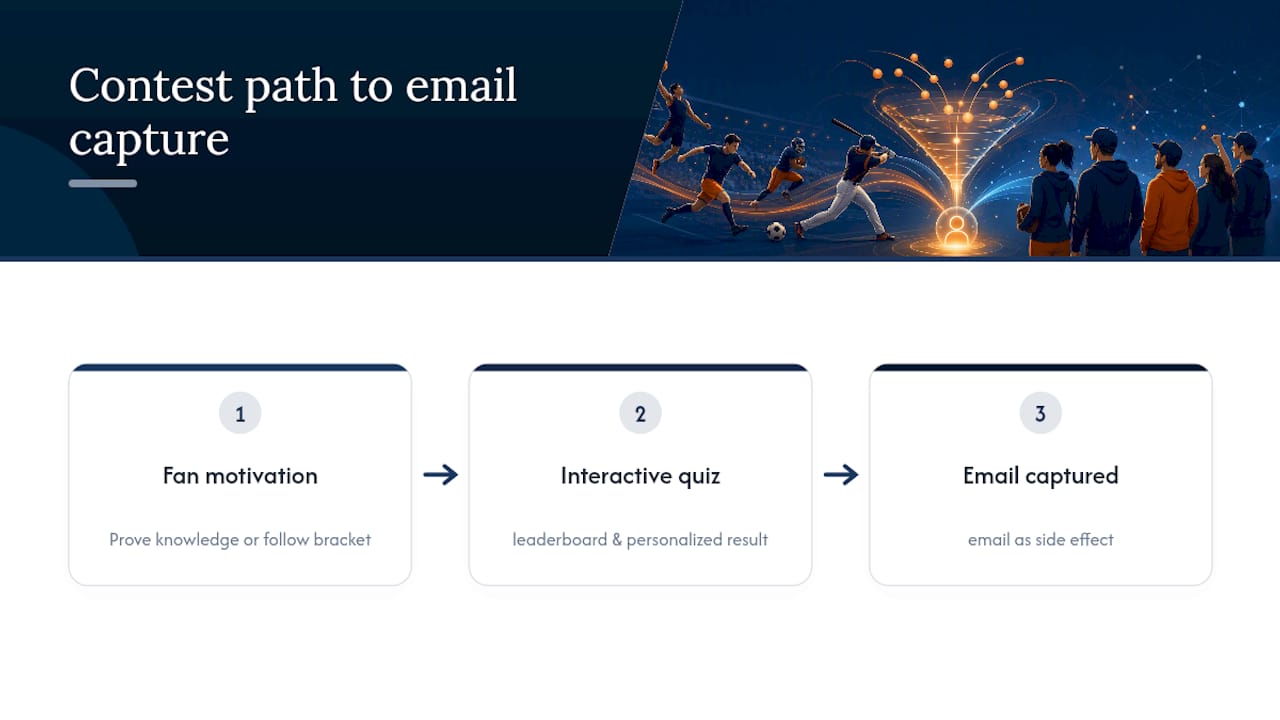
Quick-Play Tactics: Pick One Format That Scales Signups
Three contest formats cover almost every use case for sports publishers running email list building contests, and each one earns its keep differently.
- Quiz (6 to 10 questions): Mobile-first, instant results, and a shareable result card. This is your fastest path to viral reach and works well with a soft-gate right before the score reveal.
- Bracket (16 teams): Run rounds every 3 to 5 days to stretch engagement across multiple weeks. Bracket contests generate repeat visits each time a round advances, which means multiple chances to capture or reconfirm an email.
- Weekly prediction pool or leaderboard: Cumulative scoring across a season builds habit loops. This format sacrifices some viral reach for retention, but it produces the highest lifetime value per subscriber.
If your goal is a quick spike in list size around a single big event, run the quiz. If you want a subscriber who opens your next ten emails, the bracket or the season-long pool earns that loyalty over weeks instead of minutes.
Designing the Contest: UX, Timing, and Prize Fit
A contest that converts is mostly a design problem, not a content problem. Get these details wrong and even a great concept underperforms.
- Keep it mobile-first with a visible progress bar. Most sports fans will hit your contest from a phone during a game or a commute.
- Target 60 to 90 seconds total completion time for quizzes. Short, shareable quizzes in that window have boosted weekly visits and newsletter signups by 10 to 25% in publisher experiments.
- Match the prize to the audience, not the budget. A signed jersey pulls in casual entrants who never open another email; a season-long fantasy pass or exclusive stats access pulls in fans who stick around. Prize ideas tied to sports fantasy players work best when they filter for genuine fandom.
- Build a cadence, not a one-off. A weekly quiz series or a bracket with fixed round dates gives you a reason to email the same list again next week.
- Test load speed on the actual landing page and embed. A three-second delay on a stadium Wi-Fi connection kills completion rates before the first question loads.
Pro Tip: Tie your prize story to something specific, the way Jersey Mike's did with its Tailgate Trivia campaign built around a regional tour — a generic gift card converts fewer entrants than a prize connected to a story fans already follow.
Where Should You Place the Email Gate?
The gate goes right before the payoff, not before the play. Ask for an email upfront and most visitors bounce before they ever see what the contest offers. Ask for it after they have answered every question, filled out a bracket, or cast a prediction, and you are trading a form for something they already want to see.
- For quizzes, gate at the results reveal, right before the score and share card appear.
- For brackets, gate at the first vote or right before final bracket submission, not on the landing page.
- For leaderboards, gate before the player can see their rank against other entrants.
Interactive-content playbooks report contest landing pages convert around 30% of visitors when the gate sits at that point of maximum interest, well above what upfront email forms typically pull. Keep the form itself light: one field, a one-line privacy note, and a prefilled email if the visitor arrived through a link you sent. Progressive profiling, where you ask for a favorite team or birth year on a second visit instead of all at once, keeps friction low without sacrificing the data you eventually collect.
Distribution: Seeding Entrants and Getting Shares
A contest with zero starting traffic never generates enough data to matter. Seed it deliberately, then let the format do the sharing work.
- Send the launch to your existing list first. Early entrants set the leaderboard and give latecomers something to beat.
- Build an auto-generated share card for every result, with prewritten copy that entrants can drop straight into a text thread or social post.
- Embed the contest on your homepage, not buried three clicks deep, and pair it with a push notification if you have one.
- Run a small paid push to lookalike audiences early in a bracket or season pool, since a leaderboard with ten names on it feels dead compared to one with a thousand.
- Match your promotion to the contest's own rhythm: a launch push, a last-chance reminder before the deadline, and a results announcement that doubles as the next round's invitation.
Daily formats compound this advantage. A daily trivia rhythm gives you a promotion moment every single day instead of one shot at launch.
Turning Contest Behavior Into Subscriber Segments
Not every entrant deserves the same follow-up email. Segment by behavior the moment the contest closes, because a repeat player and a one-time entrant have almost nothing in common as future subscribers.
- Segment on entry: repeat players, top scorers, team-specific fans, and one-time entrants each get their own tag.
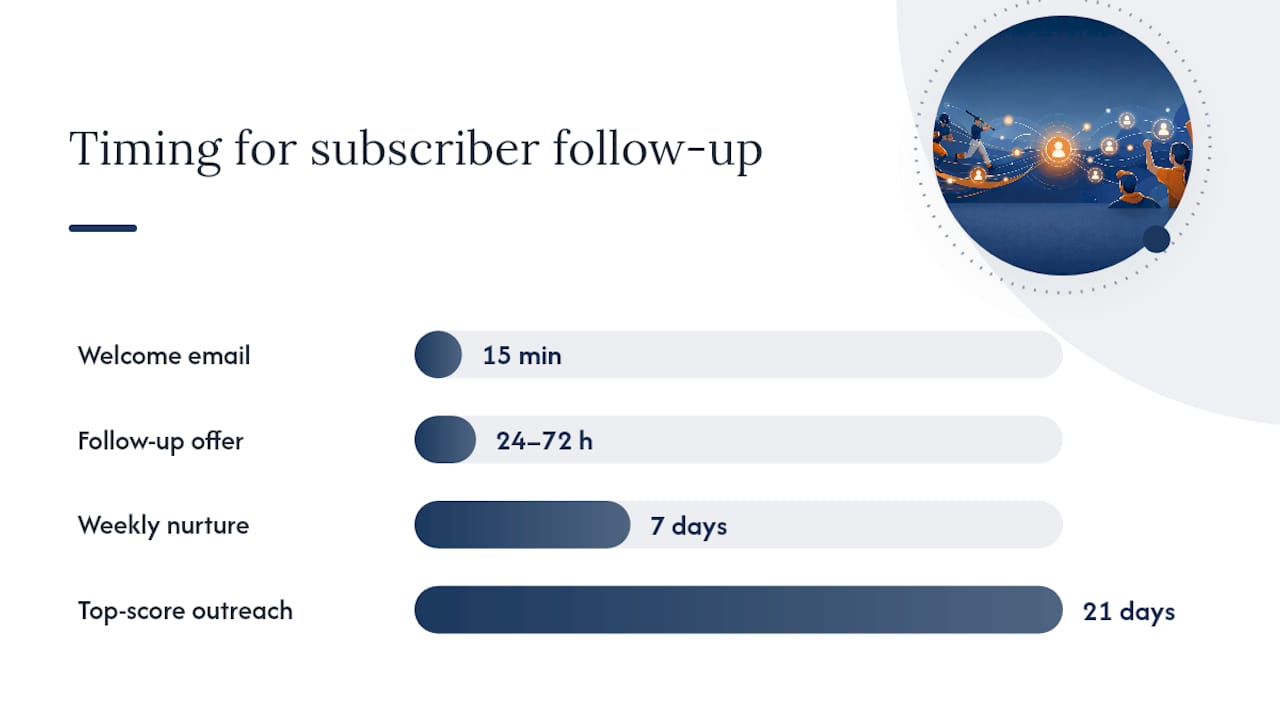
- Send a welcome sequence within 15 minutes that includes the share image and a leaderboard link. Fast turnaround on this welcome email drives immediate re-engagement while the contest is still fresh in mind.
- Follow up 24 to 72 hours later with a targeted offer for your highest-engagement players, since they are the most likely to act on it.
- Build ongoing nurture flows: weekly quiz invites for the general list, an exclusive leaderboard invite for top scorers, and offers tied to the team a player picked most often.
Wire your email service provider to tag entrants automatically through a webhook the moment they submit, and map those tags to your automation triggers before launch, not after. Ready-made contest email templates for announcements, reminders, and results save real setup time here.
Pro Tip: Treat your top-score segment differently everywhere, not just in email. A fan who leads a leaderboard three weeks running is worth a direct message, not just a newsletter.
What Numbers Should You Track and Target?
Five metrics tell you whether a contest is working: landing page conversion, email capture rate, completion rate, share rate, and 7 and 30 day return rate. Everything else is noise.
- Landing page conversion: aim near the 30% benchmark that well-designed interactive content typically hits.
- Completion rate: target 40 to 70% for quizzes; below that, your question count or design is too heavy.
- Email capture rate: expect 8 to 30% depending on how late you place the gate, with later gates capturing more.
- Share rate: a practical scaling threshold is completion above 55% and share rate above 3% before you invest in a bigger version.
If completion drops, shorten the quiz before you touch anything else. If email capture lags, move the gate later rather than adding more fields to the form. Track all of it with UTM parameters on every distribution channel and GA4 events on each contest step, then check cohort behavior weekly instead of guessing from a single dashboard number.
Publisher Perspective: Building a Season-Long Program
Most publishers treat contests as one-off stunts around a big game, then wonder why the list stalls between events. The stronger model runs contests as recurring editorial units tied to matchweeks, draft windows, and tournament rounds, the same way you'd schedule a weekly column. Consistency, not novelty, is what drives long-term retention here, and a streak mechanic or cumulative leaderboard rewards the fans who show up every week instead of once. Sponsors will pay for a piece of that rhythm too, whether that's a branded weekly quiz or a leaderboard prize tied to a merch discount. An embeddable option fits into that calendar without forcing your team to rebuild the contest engine every season.
— peter
Launch Faster With Megasports Arena's Embed-Ready Games
Building a quiz engine, a bracket system, and a leaderboard from scratch eats weeks of engineering time that most sports sites don't have to spare. Some platforms give you embeddable games, scheduling tools, and blog-ready templates so you can put a live contest on your site in the time it would otherwise take to spec one out. Instead of coding a results screen and a share card yourself, you drop in a game that already handles both, along with the leaderboard mechanics that keep entrants coming back round after round.

Publishers who bolt on a DIY contest often lose weeks to bugs on mobile load times or scoring edge cases; an embedded option skips that entirely and gets a leaderboard live the same week. If you want to see the mechanics before committing your own contest calendar to it, check out how sports rummy plays or browse the how-to-play guide to walk through the setup end to end.
Sources
The benchmarks and format guidance here draw on the Genius Sports fan database case study, interactive content gating playbooks, and bracket-specific lead generation guidance. For segmentation tactics beyond contests, Nectar's email segmentation guide is worth a read, and multi-round scheduling gets easier with help from tournament series scheduling tools.
- Three unmissable ways to grow a fan database | Genius Sports
- Riddle — interactive content playbooks
- Run a Bracket-Style Contest to Capture Emails (Step-by-Step Playbook) - Poper
- Designing shareable club quizzes: Toolkit for 2026
FAQ
Do Sports Contests Actually Grow Email Lists?
Yes. Contests that soft-gate at the results reveal convert visitors into subscribers far more reliably than upfront forms, with landing pages often converting around 30% of visitors when the gate is placed correctly.
When Should I Place the Email Gate in a Quiz?
Place it right before the score or results screen appears, not on the landing page. Entrants who have already invested 60 to 90 seconds answering questions are far more willing to trade an email for their result.
How Long Should a Bracket Contest Run?
Schedule rounds every 3 to 5 days so the bracket stays active across multiple weeks, giving you a fresh email touchpoint at every round instead of one shot at the start.
What Completion Rate Should a Quiz Aim For?
Target 40 to 70% completion for a mobile-first quiz. If you're consistently below that range, the quiz is likely too long or too slow to load on mobile.
Can I Embed a Contest Instead of Building One Myself?
Yes. Options like Megasports Arena's sports rummy leaderboard let you add a live contest experience to your site without building the scoring and results engine from scratch.