You need exactly four emails to run a sports contest that converts: the launch, one or two reminders, the winner announcement, and a follow-up for everyone who didn't win. Skip any of them and entries drop or trust erodes. The 3-email cadence (launch, soft reminder, urgent deadline) keeps entries flowing without triggering spam complaints, and every message should carry a single, unmistakable call to action. Below are the sports contest email templates, subject lines, and design rules to build all four.
TL;DR:
- Sending exactly four targeted emails—launch, two reminders, and winner announcement—is crucial to maintain engagement and trust, avoiding drop-offs.
- Mobile-first design, clear calls-to-action, and consistent branding with team colors and images significantly increase contest entry and click rates.
- Incorporating real-time leaderboards, prediction pools, and interactive elements encourages repeated visits and boosts overall participation.
- Clear, short rules summaries in emails help reduce entry friction and legal risks, especially regarding eligibility, timelines, and prize delivery.
- Proper segmentation by sport, engagement level, and location sharpens relevance, while timing reminders around game days maximizes audience attention.
Table of Contents
- Sports Contest Email Templates You Can Copy and Adapt
- What Subject Lines and CTAs Actually Drive Opens?
- Does Your Contest Email Actually Render on Mobile?
- How Do You Write Contest Rules People Actually Read?
- How Megasports Arena Runs Contests That Sports Fans Actually Finish
- What Personalization Actually Moves the Needle?
- Should You Segment Sports Contest Emails by Sport or Behavior?
- What Legal Rules Apply to Sports Contests?
- What Mistakes Tank Sports Contest Email Campaigns?
- How Do You Design Contest Emails That Sports Fans Notice?
- What Timing and Psychology Actually Move Entries
- Ready to Run Your Next Contest Without Starting From Scratch?
- Where to Find More Contest Email Guidance
- Sources
Sports Contest Email Templates You Can Copy and Adapt
Every sports contest campaign runs on the same backbone: launch, reminder, winner announcement, and follow-up. That's the structure most successful giveaway campaigns follow, and sports fans respond to it especially well because the fixture calendar gives you a natural sense of urgency to borrow.
1. Launch email. Lead with the prize, not the brand. Sports fans skim, so the headline needs to do the selling in five words or less.
Subject: Win Front-Row Seats to Sunday's Game 🏈 Preview: One entry. Zero cost. Ends Friday at midnight. Body: "We're giving away [prize] to one lucky fan. Enter in 30 seconds, no purchase required. Full eligibility rules and terms are linked below." CTA: Enter Now (single button, above the fold)
2. Reminder emails (two variants). The first reminder should feel like a nudge, not a sales pitch. The second should feel like a closing door.
- Soft reminder (days 2 to 4): "Still time to enter, plus here's what you get if you win" — leads with a new benefit angle, like a behind-the-scenes prize detail.
- Urgent reminder (final 24 hours): "Entries close tonight at 11:59 PM" — short, blunt, single CTA, ideally sent the morning of game day for a sports-specific hook.
3. Winner announcement. This is the email people screenshot and share, so treat it like a celebration, not an administrative notice.
Subject: 🎉 We Have a Winner! (Plus a Bonus for Everyone Else) Body: Name the winner, show proof (a photo, a quote, or a leaderboard rank), and invite the winner to share on social. Include a soft plug for your next contest. CTA: See the Full Results
4. Follow-up for non-winners. Don't let entrants who lost simply vanish from your list. A secondary incentive like a discount code, exclusive content, or early access to your next contest converts a chunk of disappointed entrants into repeat players.
Personalize each template with the entrant's first name, the specific sport or team they follow if you've captured it, and a rules link that sits in the footer, never buried in body copy. Keep prize images compressed and place them below the headline, not above it, so mobile inboxes don't clip the visual before the message loads.
What Subject Lines and CTAs Actually Drive Opens?
Subject lines for sports contests work best when they borrow urgency from the game clock itself. "Kickoff Giveaway: Win Tickets Before the Final Whistle" outperforms a generic "Enter Our Contest" almost every time, because it ties the offer to a moment fans already care about.
Strong subject line patterns to test:
- Prize-first: "Win [Specific Prize] Before Sunday"
- Urgency-first: "6 Hours Left to Enter"
- Curiosity-first: "You Won't Believe This Week's Prize"
- Team-specific: "[Team] Fans, This One's for You"
Preheader text should extend the subject line, not repeat it. If the subject says "Win Courtside Seats," the preheader can add "Plus: how three other fans already won big this season."
Every email needs exactly one CTA. Mixing multiple calls to action confuses mobile readers and tanks click-through, especially on a screen where thumbs are doing the scrolling. Stick to action verbs: "Enter Now," "Claim Your Spot," "See If You Won."
Three A/B tests worth running on your next campaign:
- Subject line: urgency-based versus prize-based framing
- CTA button color: team colors versus a neutral high-contrast color
- Send time: morning of game day versus the evening before
Does Your Contest Email Actually Render on Mobile?
Most sports fans open contest emails on their phones between innings, during commercial breaks, or on the train home from the stadium. If your layout breaks on a 6-inch screen, you've lost the entry before they finish reading the headline.
Build every template mobile-first: single-column layout, a CTA button placed above the fold, and images sized so they load fast on cellular data. Responsive design and a distinct single CTA are the two factors that most consistently separate high-converting giveaway emails from the rest.
Deliverability matters just as much as design. A handful of habits keep your contest emails out of the spam folder:
- Authenticate your sending domain with SPF and DKIM records before launch, not after your first bounce spike.
- Keep a healthy text-to-image ratio. All-image emails trigger spam filters and fail to load for readers with images disabled.
- Avoid spam-trigger words like "free," "guaranteed," and excessive exclamation points stacked in a subject line.
- Include a visible unsubscribe link and honor it immediately.
Once the campaign is live, watch four numbers closely: open rate, click-through rate, entry-to-click conversion, and unsubscribe rate. A launch email with a strong open rate but weak clicks usually points to a CTA problem, not a subject line problem. If unsubscribes spike after your second reminder, you've likely violated the 3-email rule and pushed the cadence too hard.
If you'd rather skip building templates from scratch, drag-and-drop editors and prebuilt template libraries shave hours off the build without sacrificing a responsive layout.
How Do You Write Contest Rules People Actually Read?
Nobody reads a full terms and conditions document in their inbox, and nobody should have to. What builds trust is a short rules summary in the email itself, paired with a link to the complete legal terms hosted on your site.
Your in-email summary needs four things at minimum:
- Eligibility: age, location, and any account requirements.
- Winner selection: random draw, judged entry, or performance-based (predictions, leaderboard rank).
- Timeframes: entry deadline and the date winners get notified.
- Prize fulfillment: how and when the prize ships or unlocks, plus any tax responsibilities on the winner's end.
Transparent, easy-to-find rules reduce entry friction and protect you legally at the same time, which makes the rules summary one of the few email elements that pulls double duty. For a deeper walkthrough of building compliant terms, Megasports-arena's guide on how to write contest rules covers the specific language U.S.-based fantasy sports contests need.
Retention doesn't end at the winner announcement. Offer non-winners a discount code, early access to your next contest, or exclusive content tied to their favorite team or sport.
Pro Tip: Send your rules summary as a simple three-line list, not a paragraph. Entrants scan emails; they don't read them line by line.
How Megasports Arena Runs Contests That Sports Fans Actually Finish
Megasports Arena runs contest formats built specifically for sports fans rather than generic sweepstakes software, which changes what a "winner announcement" email even needs to say. When your contest includes a live leaderboard or a prediction pool, the announcement can point straight to real-time results instead of a static "congratulations" graphic.
A few formats that consistently pull repeat entries:
- Prediction-based pools tied to real MLB, NBA, NFL, or NHL matchups
- DIY custom pools for site partners who want a branded, embeddable version
- Sports trivia contests with instant leaderboard placement
- Archived results pages that let entrants compare their pick history across seasons
For prize inspiration that fits a sports audience specifically, Megasports Arena's post on contest prize ideas for fantasy players breaks down what actually motivates repeat entries versus a one-time click. You can also see the format in action on the current active contests page.
What Personalization Actually Moves the Needle?
Personalization in sports contest emails goes well beyond dropping a first name into the subject line, though that alone still lifts open rates. The bigger win comes from segmenting by team affiliation, sport preference, or past contest behavior, then writing the email as if it's speaking to that specific fan.

A subject line that says "Lakers Fans: Win a Signed Jersey" will beat a generic "Win a Signed Jersey" almost every time among readers who've shown interest in that team, because it signals relevance before the email even opens.
Beyond team-based personalization, layer in behavioral triggers:
- Past entrants get a "you're already entered, here's a bonus way to earn extra chances" message instead of a repeat pitch.
- Non-entrants from your last contest get a lower-friction ask, sometimes a one-click entry instead of a full form.
- High-engagement fans (frequent openers, leaderboard regulars) get early access to new contests before the general list.
Dynamic content blocks help here too. If your platform supports it, swap the hero image based on the entrant's favorite sport so a hockey fan sees a rink-side prize while a baseball fan sees stadium seats in the same campaign send. This takes more setup than a single static template, but the lift in click-through usually justifies the extra build time for any contest running across multiple sports.
Timing personalization matters as much as content personalization. A fan who typically opens emails at 8 PM shouldn't get your urgent reminder at 7 AM. Most email platforms let you send based on individual open-time history rather than a single blast time for the whole list.
Should You Segment Sports Contest Emails by Sport or Behavior?
Segmentation is what separates a contest campaign that feels relevant from one that feels like spam. The most obvious split is by sport: your MLB fans and your NHL fans want different prizes, different urgency triggers, and often different send times based on when their season is active.
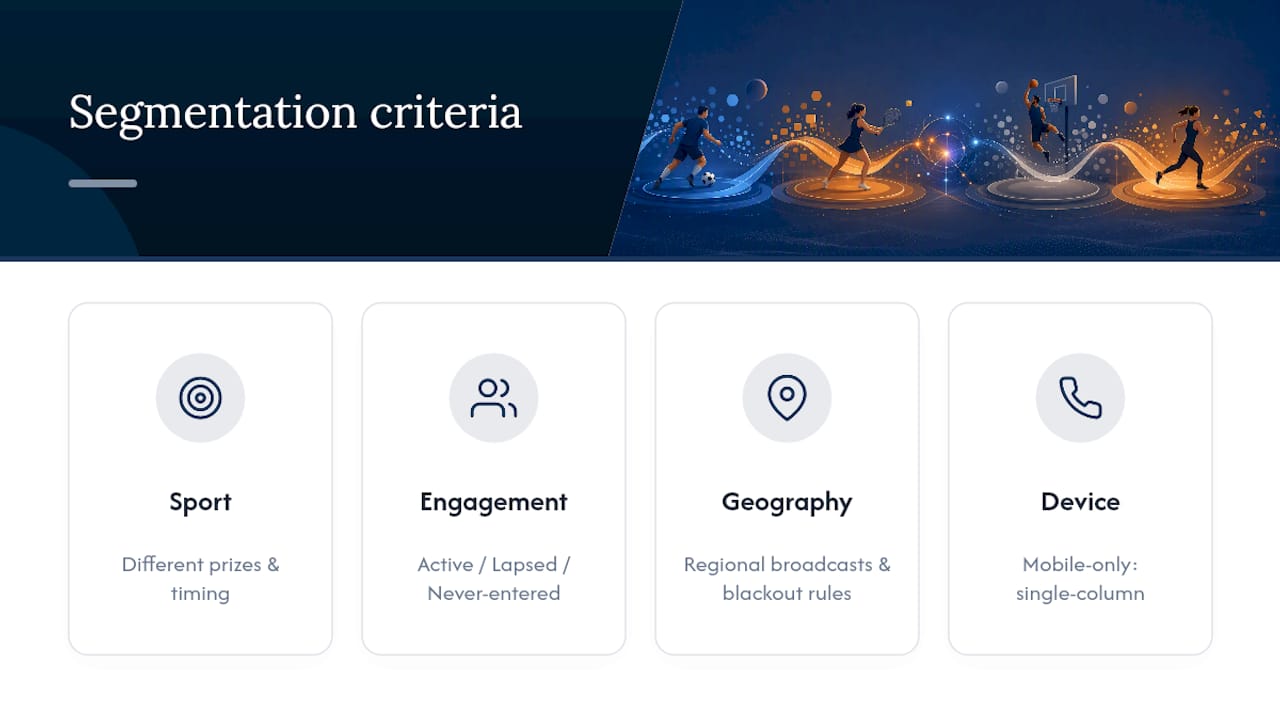
Beyond sport preference, three segmentation layers consistently improve results:
Engagement level. Split your list into active players, lapsed players, and never-entered contacts. Active players respond well to leaderboard-based urgency ("You're 200 points from the top 10"). Lapsed players need a reintroduction, often with a bigger incentive to re-engage. Never-entered contacts need the simplest possible entry path with minimal friction.
Geography. Regional teams and blackout rules make location-based segmentation more than a nice-to-have for sports contests specifically. A contest tied to a regional broadcast or a location-restricted prize needs its own segment so you're not promising fans in the wrong market something they can't actually claim.
Device and platform behavior. If a chunk of your list only opens on mobile, that segment should get a stripped-down, single-column layout by default rather than the desktop-optimized version. Testing this split alone often reveals a click-through gap you didn't know existed.
Avoid over-segmenting to the point where your smallest lists become statistically meaningless. Four to six well-defined segments usually outperform twenty micro-segments that each get too few sends to learn from.
What Legal Rules Apply to Sports Contests?
Sports contests carry a specific set of legal considerations that generic sweepstakes advice often glosses over, and getting them wrong creates real liability, not just a bad look.
Age restrictions need to be explicit and enforced at entry, not just mentioned in fine print. Most U.S. states set contest eligibility at 18, though a handful allow 13 with parental consent for no-purchase-necessary promotions. State the minimum age in the entry form itself, not just the T&Cs.
Location-based rules matter more for sports contests than most other categories because broadcast rights, regional blackouts, and state-specific gaming regulations can restrict who's actually eligible for certain prizes. A ticket giveaway tied to a specific stadium, for instance, may need to exclude entrants who can't reasonably attend, or you risk awarding a prize the winner can't use.
"No purchase necessary" language protects you from your contest being classified as an illegal lottery under most state laws, which require that chance, consideration (payment), and prize can't all be present at once. If your contest involves any entry fee or purchase requirement, consult a legal professional in your state before launch rather than copying language from a competitor's email.
Prize fulfillment timelines and any tax reporting obligations (prizes over a certain value often require a 1099 form for U.S. winners) belong in your full terms, linked clearly from every contest email. Skipping this step is one of the most common ways sports contests run into trouble after the fact.
What Mistakes Tank Sports Contest Email Campaigns?
The most common failure isn't a bad prize or weak copy. It's cadence. Sending five reminder emails instead of the two the 3-email rule recommends drives unsubscribes faster than almost anything else, because fans start associating your brand with inbox clutter instead of excitement.
A second frequent mistake: burying the CTA. Marketers often add a "Learn More" secondary button alongside "Enter Now," thinking it gives readers options. It doesn't. It splits attention and measurably lowers click-through on the primary action.
Vague rules summaries cause a quieter but costlier problem. When entrants can't quickly tell if they're eligible, a portion simply won't bother entering, and the ones who do enter without reading the fine print become the support tickets and social media complaints you deal with after the winner announcement.
Ignoring non-winners is the mistake with the longest tail. A one-time entrant who never hears from you again after losing has no reason to open your next contest email. Building a simple consolation offer into your follow-up template, even something as small as a 10% discount code, keeps that relationship alive for the next campaign.
Finally, watch for mismatched urgency and actual deadlines. If your subject line says "Last Chance" three days before the real deadline, you train your list to ignore future urgency messaging entirely, which defeats the purpose of the final reminder when you actually need it.
How Do You Design Contest Emails That Sports Fans Notice?
Sports audiences respond to visual cues that feel like game day, not like a marketing template. Team colors, stadium or arena imagery, and bold, high-contrast typography tend to outperform generic "clean corporate" email design for this specific audience.
A few design choices worth prioritizing:
- Use your prize photo as the hero image, positioned right under the headline, not buried below three paragraphs of copy.
- Lean into color contrast between your CTA button and background. A single bright button against a darker sports-themed background draws the eye faster than a subtle, on-brand pastel.
- Keep typography bold and short. Sports fans scan headlines the way they scan scoreboards, quick glance, quick decision.
- If you're running a leaderboard-based contest, include a small live-rank snapshot in the email itself rather than making readers click through to check their standing.
Static images alone tend to underperform against anything interactive. Embedding a lightweight interactive element, like a prediction widget or a mini leaderboard preview, keeps fans engaged with the brand beyond the single click, and it gives them a reason to return even before the contest ends.
What Timing and Psychology Actually Move Entries
Contest emails succeed or fail on timing more than most marketers admit. Send your launch email in the days leading up to a major fixture, and schedule your urgent reminder for the morning of game day, when fan attention naturally peaks.
Gamified entries consistently beat plain click-to-enter forms. A prediction contest or a live leaderboard gives entrants a reason to check back repeatedly, not just once. That repeat visit is worth more to a sports brand than the initial entry itself.
Friction kills entries faster than a weak prize does. Keep forms to two or three fields, put your prize image near the top, and never make someone click twice to find your CTA. The fans most likely to enter are also the ones most likely to abandon a clunky form halfway through.
— peter
Ready to Run Your Next Contest Without Starting From Scratch?
Building and testing contest emails from a blank template takes real time, and most sports marketing teams don't have a spare week to spend on layout tweaks before the next fixture. Megasports Arena gives you a hosted alternative: real prediction pools, live leaderboards, and embeddable game formats already built for sports fans, so your contest doesn't depend entirely on whether your email renders correctly on someone's phone.

Instead of emailing a static prize photo and hoping people click, you can point entrants straight to a live sports rummy game with a running leaderboard they can check in on between your reminder emails. That real-time element does something a static template can't: it gives fans a reason to come back before you even send the winner announcement. Check the current leaderboard to see how standings update live, and if you're new to the format, the how-to-play guide walks through setup in a few minutes.
Where to Find More Contest Email Guidance
- Giveaway email examples and campaign stages — breaks down the launch, reminder, and winner-announcement structure in detail.
- Giveaway email best practices — covers mobile optimization and single-CTA design.
- Announcing contest winners and building trust — rules transparency and retention tactics.
- Giveaway email templates and build guidance — drag-and-drop template libraries for faster builds.
- Gamification in email marketing — prediction widgets and leaderboard mechanics for repeat engagement.
- Examples of gaming giveaways — prize framing and entry mechanic inspiration.
Sources
- Giveaway email examples and campaign stages (Designmodo)
- Giveaway email best practices (Mailchimp)
- Announcing contest winners and trust best practices (Gleam)
- Giveaway email templates and build guidance (GetResponse)