
Find contest schedules through the authoritative calendars organizers actually use: the WA7BNM Contest Calendar for amateur radio, the ARRL contest calendar for log deadlines, Toastmasters division pages for speech contests, and Kaggle for coding competitions. Subscribe to their iCal or RSS feeds, turn on email alerts, and drop the key dates into your own calendar today. That single habit solves most of the scheduling headaches this guide covers.
TL;DR:
- Most contest schedules are available in multiple views, from weekly and monthly to annual, helping organizers avoid conflicts and participants plan effectively.
- Export formats like iCal, direct Google Calendar links, and RSS feeds cater to different needs, but time zone conversions, especially UTC, remain a common source of confusion.
- For amateur radio, log due dates and contest start times are critical for eligibility, making calendar subscribe and reminder setup essential to avoid disqualification.
- Organizers should plan deadlines and promotional timelines at least 4 to 8 weeks in advance, with separate reminders for registration, briefings, and log submissions.
- Prioritizing authoritative scheduling sources relevant to each contest type leads to fewer errors and better participant engagement than promotion tactics alone.
Table of Contents
- What Contest Calendars Look Like: Formats and Views
- Where to Find Schedules by Contest Type
- How to Track and Subscribe to Contest Schedules
- Scheduling Best Practices for Contest Organizers
- Legal and Platform Compliance Checklist for Online Contests
- How Megasports Arena Keeps Your Contest Schedule Straight
- Timing Your Promotion Around the Schedule You've Set
- Common Pitfalls in Scheduling Online Contests
- What the Research Actually Supports
- Run Your Own Contest Schedule Through Megasports Arena
- Sources
What Contest Calendars Look Like: Formats and Views
Most contest calendars give you the same date information sliced into different time windows, and picking the right one saves you from either missing an event or drowning in noise. An 8-day view suits last-minute planning when you just need to know what's running this weekend. A 5-week view works for near-term scheduling, the sweet spot for most casual participants. A 12-month or perpetual view matters if you're an organizer trying to avoid stepping on another group's date, or a serious competitor building an annual practice schedule.
The WA7BNM Contest Calendar is the cleanest example of this layered approach, offering all four views for amateur radio events plus export options that plug directly into your existing tools. Each format serves a different planning horizon:
- 8-day view: quick check for this weekend's activity, good for spontaneous entries
- 5-week view: the default for most regular participants tracking upcoming windows
- 12-month view: essential for organizers avoiding date collisions with major events
- Perpetual/rolling view: useful for recurring contests that repeat on a fixed annual pattern
Export formats matter as much as the view itself. An iCal (.ics) file syncs once and then updates automatically inside Apple Calendar, Outlook, or Google Calendar, but it depends on the source refreshing the file correctly. A direct Google Calendar link is faster to set up for casual users but less portable if you switch calendar apps later. RSS feeds are the best option if you want a running log of changes without cluttering your calendar app, though you'll need a reader or automation tool to catch updates in real time. Time zones trip up more people than any other factor. Amateur radio contests almost always post start times in UTC, so convert before you commit an evening to a contest that actually started six hours earlier than you thought.
Where to Find Schedules by Contest Type
Each contest category has its own trusted source, and organizers publish very different information depending on the field.
Amateur radio. The WA7BNM Contest Calendar and the ARRL contest calendar are the two sources every serious operator checks first. ARRL specifically lists contest weekends for the coming year and includes log due dates, which matter because missing a submission window can disqualify an otherwise winning entry.
Coding and hackathons. Kaggle publishes competition schedules alongside submission windows and evaluation criteria, and its hosting guidance notes that many contests accept multimedia writeups rather than just code, which changes how far in advance teams need to start preparing. University-run events follow a similar pattern. The Battle of the Brains Coding Contest posts a day-of agenda directly on its landing page, so participants know exactly when registration closes and when problems drop.
Speech and club contests. Toastmasters runs a tiered system, and division and area pages publish the full club-to-area-to-division timeline, including mandatory briefing dates for both contestants and judges. Skip the briefing and you can be disqualified before you say a word.
Marketing giveaways. Platform-based promotional contests rely less on a central calendar and more on planning tools. Giveaway builders like Gleam generate a dated 12-month plan, while checklist tools such as BlitzRocket help organizers sequence launch and entry deadlines.
How to Track and Subscribe to Contest Schedules
Once you know where the schedules live, the next step is making sure you never have to check them manually again.
- Import the calendar feed. Grab the iCal (.ics) link or Google Calendar URL from your chosen source and add it to your primary calendar app. Set reminders for registration close, contest start, and log due date separately. treating these as one event is the single most common way people miss a submission window.
- Subscribe to RSS for changes. Contest dates shift more often than people expect, especially for smaller club or amateur events. Forward RSS updates to an automated channel, an email rule, a Slack channel, or a Discord webhook, so a schedule change lands where you'll actually see it.
- Join the organizer's email list. Official notices often carry rule clarifications that never make it into the public calendar. This is also usually the first place a postponement gets announced.
- Build a 12-month planning calendar. Block out a planning deadline, a promotion start date, registration close, event day, and log due date for every contest you care about, whether you're competing or hosting.
Pro Tip: Set your log-due reminder for 24 hours before the actual deadline, not the day of. Amateur radio log software and contest upload portals both tend to slow down or error out in the final hour before a deadline, when everyone submits at once.
A platform like Megasports Arena can also centralize reminders across multiple contests at once, which matters once you're tracking more than two or three schedules simultaneously.
Scheduling Best Practices for Contest Organizers
Duration should match complexity, not ambition. A trivia or puzzle contest works best as a single-day event. Coding sprints run cleanest at 24 to 72 hours. Multi-day hackathons need built-in checkpoints, typically a kickoff briefing, a midpoint check-in, and a final submission window, or teams lose momentum halfway through.
A reliable timeline template looks like this:
- 6 to 8 weeks before: lock the planning deadline and confirm rules, prizes, and judging criteria
- 4 weeks before: open the promotion window and start building the calendar listing
- 48 to 72 hours before: close registration
- 24 to 48 hours before: hold the judge and contestant briefing
- Post-event: enforce the log due date and begin winner verification
Giveaway calendar tools built around a 12-month planning structure exist specifically because organizers who skip a written timeline tend to compress every stage into the final week, which is when most scheduling conflicts and rule disputes happen. Checking rival contest calendars before you set a date avoids splitting an audience that could otherwise show up for both events. Running on a repeatable cadence, monthly, quarterly, or annual, also builds a habit loop: participants start checking your calendar the way they check ARRL's, without you having to re-promote from zero every time.
Legal and Platform Compliance Checklist for Online Contests
Before you publish a single date, get the legal basics locked down. Skipping this step is how well-run contests turn into disputes.
- Write eligibility rules, entry mechanics, and winner selection criteria in plain language, and publish them alongside the contest dates, not buried in a separate document.
- Confirm your contest complies with federal and state sweepstakes and lottery rules before you open entries, since requirements vary by state and by prize value.
- Check the specific promotion rules of any social platform you're using to announce or run the contest; most have their own contest policies separate from general law.
- Document your winner notification process and prize fulfillment plan in writing, and keep records in case a participant disputes the outcome.
A state-by-state legal guide is worth bookmarking if you run contests regularly, since rules on eligibility and prize disclosure shift more than most organizers expect.
How Megasports Arena Keeps Your Contest Schedule Straight
Megasports Arena's Active Contests page works the same way WA7BNM's calendar does for radio operators, a single, current list instead of a scattered set of announcements. The My Contests and My Picks Hub features let players track which events they've entered without re-checking start times manually, and built-in notifications flag entry deadlines before they close. For organizers, embedding these schedules on a partner site keeps visitors from bouncing elsewhere to check dates. The notification setup guide covers the technical side in about ten minutes.
Timing Your Promotion Around the Schedule You've Set
The date you pick determines how well your promotion works, not the other way around. Announce too early and interest fades before entries open. Announce too late and you lose the people who plan their week around a calendar, the same audience checking WA7BNM or ARRL for what's coming up.
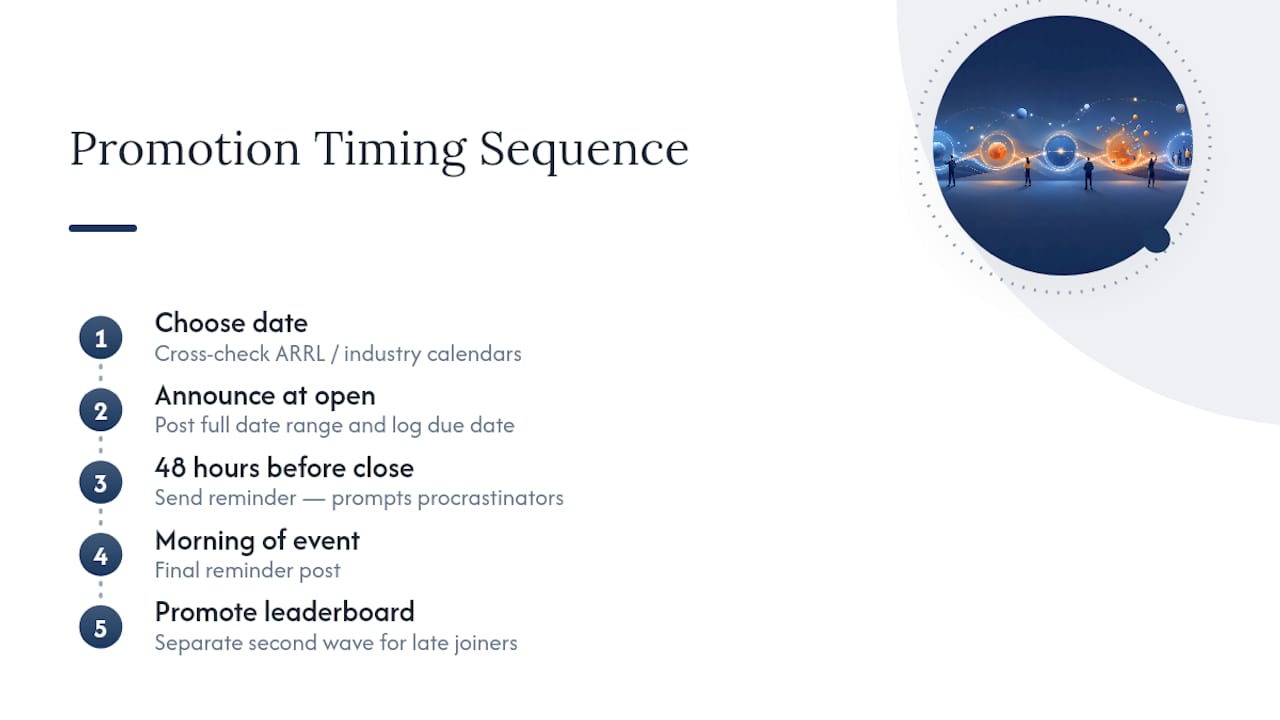
A workable promotion sequence starts the moment your registration window opens, not before. Post the contest with its full date range, including the log or submission due date, so entrants know the entire commitment up front rather than discovering a tight deadline later. Reminder posts work best at three points: one when registration opens, one 48 hours before it closes, and one on the morning of the event itself. Skipping the middle reminder is the most common gap, and it's the one that costs the most entries, since that's when procrastinators decide whether to commit.
Time your announcement against known contest calendars in your category. A speech contest promoted the same week as a major Toastmasters division event will lose attention it didn't need to lose. Cross-check your date against the ARRL contest calendar or a comparable industry calendar before locking anything in, even if your contest isn't in that category. For contests with a public leaderboard or public voting phase, promote the leaderboard's live status separately from the entry announcement. That second wave of visibility often pulls in participants who missed the original launch post but want to see how things stand before the deadline hits.
Common Pitfalls in Scheduling Online Contests
Most scheduling failures trace back to the same handful of mistakes, and all of them are avoidable with a little more lead time.
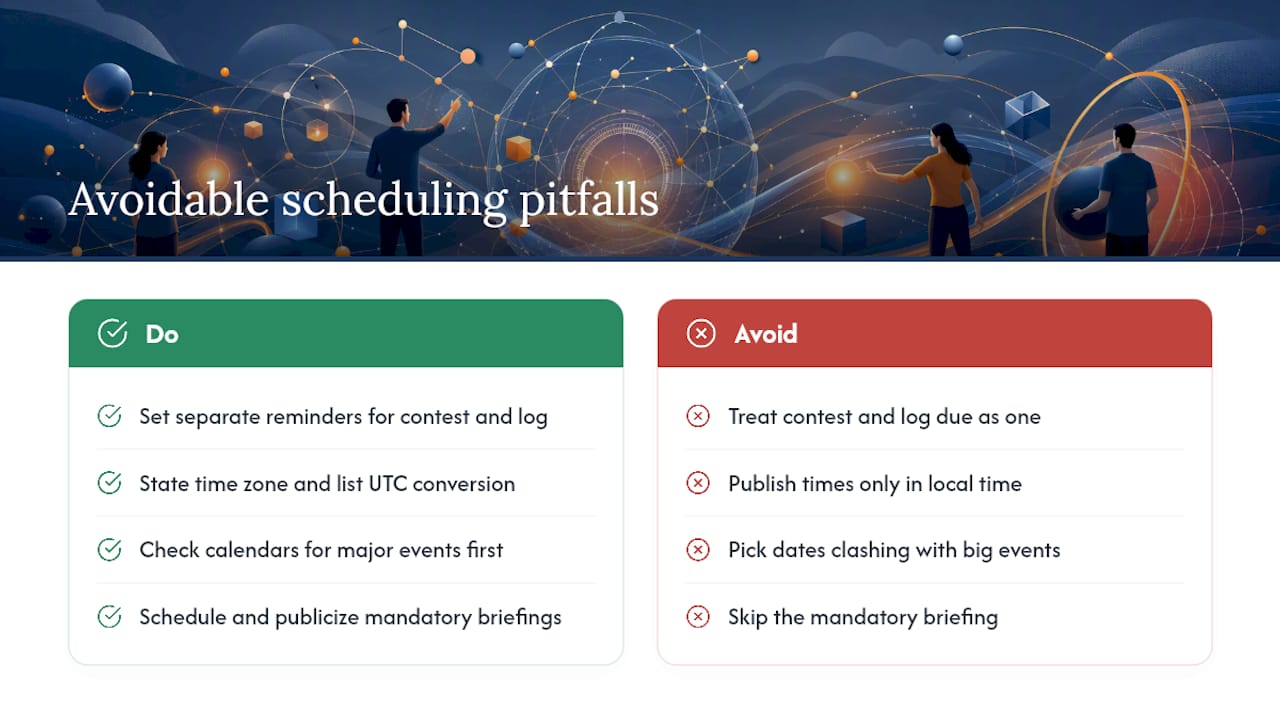
Treating the contest date and the log due date as one deadline. They're almost never the same, and conflating them is how qualified entries get disqualified. Set separate reminders for each.
Ignoring time zones when publishing the schedule. A contest listed only in the organizer's local time will confuse a national or international audience. State the time zone explicitly, or better, list it in UTC alongside the local conversion.
Scheduling against a bigger, established event. Smaller organizers frequently lose participants by picking a weekend that overlaps a major amateur radio contest, a well-known hackathon, or a division-level Toastmasters event. A quick calendar check before locking a date prevents this.
Skipping the mandatory briefing. Toastmasters contests require briefings for both contestants and judges, and organizers who forget to schedule and publicize this step end up with confused participants on contest day.
Underestimating promotion lead time. A four-week promotion window feels generous until you account for holidays, competing events, and the natural lag between announcement and actual sign-ups. Build in buffer time rather than assuming your first post will convert immediately.
No written compliance checklist. Organizers who skip eligibility and winner-selection documentation until after entries open are the ones who end up settling disputes after the fact instead of before it.
What the Research Actually Supports
The conventional advice on contest scheduling treats every contest type the same, pick a date, promote it, run it. That's backwards. Amateur radio operators plan around log due dates because a missed submission voids an otherwise winning score. Toastmasters contestants plan around mandatory briefings because skipping one means disqualification regardless of speech quality. Coding competitors plan around evaluation windows because a late writeup can sink a technically strong entry. The deadline structure, not the event date, is what actually determines outcomes.
Most guides overweight promotion tactics and underweight the boring administrative layer: log due dates, briefing requirements, time zone conversion, and separate reminders for each deadline stage. That's the layer that actually causes disqualifications and missed entries, not weak marketing.
If you take one thing from this guide, prioritize subscribing to the authoritative calendar for your contest type, whether that's WA7BNM, ARRL, a Toastmasters division page, or Kaggle, before you worry about promotion strategy or contest design. Everything downstream depends on getting the dates right first.
— peter
Run Your Own Contest Schedule Through Megasports Arena
Sports fans juggling amateur radio logs, hackathon deadlines, and Toastmasters briefings often want one lower-effort place to compete, without building a calendar system from scratch. The platform offers a free hub of fantasy sports contests, prediction pools, and trivia challenges with schedules built in, so you can check one page instead of multiple calendar sources.

Check the Active Contests page for what's running right now, or head straight into a live matchup on Sports Rummy to see how contest pools and leaderboards work in practice. If you run a sports site or community and want contest content that keeps visitors on your own pages, Megasports Arena's embeddable games are worth a look, similar in spirit to how event organizers publish public festival schedules to keep attendees informed without sending them elsewhere. Start with one contest, see how the leaderboard and picks tracking feel, and go from there.
Sources
- WA7BNM Contest Calendar: Home
- Contest Calendar
- Division & Area Online Contest Schedule
- Kaggle competitions host guidance