
Accessible game design, in the publisher sense, means building fantasy-sports games that load fast, ask nothing of the player upfront, and work the same on a phone at a bus stop as on a desktop at a desk. The immediate move is narrow: pick one lightweight widget, lazy load it, reserve its container space, and track play rate before adding anything else. Megasports-arena builds exactly this kind of embeddable, no-code game, so publishers can test the pattern without writing backend code.
TL;DR:
- Embeddable fantasy sports widgets should load quickly, require minimal user input, and be mobile-first to maximize user retention.
- Using sandboxed iframes, lazy loading, and reserved sizing helps maintain performance and avoid layout shifts during embed initialization.
- Simplifying onboarding with social sign-ins and only essential actions significantly boosts play conversion rates within the first ten seconds.
- Monitoring specific metrics such as play rate, retention, share rate, and revenue per thousand impressions enables effective performance tracking.
- Applying accessibility standards with semantic HTML, ARIA labels, and localizable content broadens reach and improves usability for all players.
Table of Contents
- What Makes Fantasy Games Easy for Broad Audiences?
- Integration and Performance Checklist for Embeddable Widgets
- How to Onboard Players Without Losing Them
- What Should You Measure and Monetize?
- Accessibility Standards Worth Knowing for Game Embeds
- Designing for Different Player Situations
- Testing Tools and Methods for Accessible Widgets
- Localization and Language Support for Wider Reach
- Popular Features in Accessible Fantasy Widgets
- Collecting Feedback to Keep Improving Accessibility
- A Publisher's View on Building Accessible Embeds
- Try an Embeddable Game on Your Site Today
- Sources
What Makes Fantasy Games Easy for Broad Audiences?
The fantasy-sports products that spread fastest share a stubborn simplicity. They don't ask a first-time visitor to draft a 15-man roster or learn scoring math before they get a payoff. They give one decision, one result, one reason to come back tomorrow.
That principle shows up in how Underdog Fantasy's product approach gets described: nail a short core loop (join, pick, watch, get a result) before layering in features. A publisher embedding a widget should copy that discipline rather than trying to replicate a full fantasy platform in an iframe.
A few rules hold up across almost every high-retention embed:
- Keep the ruleset to one screen. If a new visitor needs a tutorial, the game is too complex for an embed.
- Design mobile-first. Most traffic on a news or sports site arrives on a phone, so the widget's default state has to work at 375 pixels wide, not just at desktop width.
- Build a single, obvious call-to-action. One "Join" or "Pick" button beats three competing options.
- Add social and leaderboard mechanics after the core loop works, not before. A shareable leaderboard rank drives return visits far more reliably than an email digest.
- Offer one-tap join without a signup wall wherever the game format allows it. Every extra field between "interested" and "playing" costs you players.
- Use progressive disclosure. Show basic scoring first; hide advanced stats or custom pool settings behind a "more options" toggle so casual fans aren't scared off.
Pro Tip: Test your widget with the sound off, the screen small, and one thumb. If you can't complete a full play cycle in under 15 seconds under those conditions, your onboarding has too many steps.
Start small on purpose. A publisher playbook for building a live stats hub recommends launching one high-impact widget, like an injury ticker or a picks card, rather than a full suite. Prove the uplift, then expand.
Integration and Performance Checklist for Embeddable Widgets
Every embed decision comes down to three formats, each with a distinct tradeoff. An iframe is the safest choice for isolation. Nothing on the embedded page can touch your site's DOM or scripts, which matters if you're pulling a widget from a third party you don't fully control. A JavaScript widget renders inline with your page and can feel faster and more native, but it needs careful scoping so its styles and scripts don't collide with yours. oEmbed sits in between: a publisher pastes a URL, and the source returns embed code automatically, which is convenient for CMS platforms like WordPress but gives you less control over sizing.
Here's the sequence that keeps an embed fast, secure, and stable in production:
- Choose the embed type deliberately. Use a sandboxed iframe for third-party or untrusted widgets, a JS widget when you need tighter visual integration and control performance yourself, and oEmbed when publisher convenience matters more than customization.
- Lazy load below the fold. Use the IntersectionObserver API so the widget's script and assets don't fetch until the container nears the viewport. This alone removes most of the render-blocking damage embeds cause.
- Reserve the container size before content loads. A fixed height and width prevents layout jumps once the widget populates, which is the single biggest driver of Cumulative Layout Shift in pages that embed rich widgets.
- Add a skeleton loader inside that reserved space. A gray placeholder card beats a blank box and signals the widget is coming, not broken.
- Cap the initial payload. Architecture guidance for real-time picks widgets recommends keeping the client-side JS loader between 20 and 80 KB gzipped, with a backend aggregator handling the heavy data work server-side.
- Serve everything from a CDN, including the loader script and any WebSocket or server-sent-events endpoint, to cut latency for audiences outside your primary region.
- Preload critical CSS and fonts referenced by the widget so text doesn't flash unstyled once it mounts.
- Lock down security before launch. Serve exclusively over HTTPS, apply a Content Security Policy scoped to the widget's domain, add sandbox attributes to any iframe (
allow-scriptswithoutallow-same-originunless truly needed), and validate every postMessage payload against an expected origin and shape rather than trusting it blindly. - Sanitize any user input the widget accepts, from custom pool names to comment fields, before it touches your page or your database.
- Instrument Core Web Vitals monitoring for LCP, CLS, and INP specifically on pages carrying the embed, plus error logging and a cached fallback state so a widget outage doesn't blank out a chunk of your page.
Widgets with reserved sizing and lazy loading routinely avoid the layout-shift penalties that plague pages embedding rich content without those safeguards, according to performance analysis of embedded widgets. Widget integration guidance from Sportradar's API documentation adds semantic markup, ARIA attributes, and graceful error handling to this list, treating them as core to a production-ready embed rather than optional polish. Before you ship, run the page through PageSpeed Insights and a throttled slow-4G test to confirm the widget still behaves under weak connections, and check the responsive iframe techniques that prevent common sizing bugs on mobile browsers.
How to Onboard Players Without Losing Them
The first ten seconds of an embed decide whether a visitor plays or scrolls past. That window has to answer one question instantly: what do I do here, and what do I get for doing it? A picks card that shows today's matchup and a single "Make Your Pick" button answers that question. A widget that opens on settings or rules does not.
A few patterns consistently lift click-to-play conversion:
- Use social sign-in (Google, Apple, Facebook) instead of a registration form. It turns a 90-second task into a two-tap one.
- Apply lightweight personalization once you know a user's team or league. A picks card that defaults to "your team's next game" outperforms a generic slate.
- Save state locally so a returning visitor doesn't restart from zero. Even a simple browser cookie remembering last picks builds a habit.
- Reward the action immediately. Points, a badge, or a leaderboard position shown within a second of playing keeps the loop closed.
- A/B test button copy and placement. "Make Your Pick" against "Play Now" against a card that auto-scrolls into view on load will show real differences in your analytics within a week or two.
- Never trap the player in a modal that blocks the article underneath. Let them close the widget and keep reading; a game that holds a reader hostage gets abandoned, not converted.
Pro Tip: *Track click-to-play conversion as its own funnel step, separate from page views.
The onboarding patterns that keep visitors returning tend to treat the registration wall as the enemy, not a checkpoint. Every field you remove between landing and playing raises completion.
What Should You Measure and Monetize?
Four numbers tell you whether an embed is working: play rate (impressions that convert to a first action), 7-day and 30-day retention, share rate, and revenue per thousand impressions if the slot carries sponsorship. Track them separately from your site's general analytics, because a widget's performance can look healthy in aggregate traffic while quietly underperforming on its own terms.
Set up a simple event schema early: fire widget-impression when the container enters the viewport, widget-click on the first interaction, and widget-conversion-sent once a pick, entry, or share completes. Push these through postMessage into your existing dataLayer or analytics tool rather than building a parallel tracking system.
On monetization, three levers work without wrecking the experience:
- Sponsored widget slots, sold the way you'd sell a banner but priced on engagement, not just impressions.
- Affiliate links routed through signed redirects, so a partner's promotion doesn't require a separate script tag.
- Premium features gated behind a light paywall, such as custom pool creation or extended stat history.
Monetization models built around embeds commonly combine sponsored slots with affiliate placements rather than relying on either alone. Whatever you choose, apply consent management, geo and age gating where your jurisdiction requires it, and privacy-first analytics that don't fingerprint visitors just to count a play.
Accessibility Standards Worth Knowing for Game Embeds
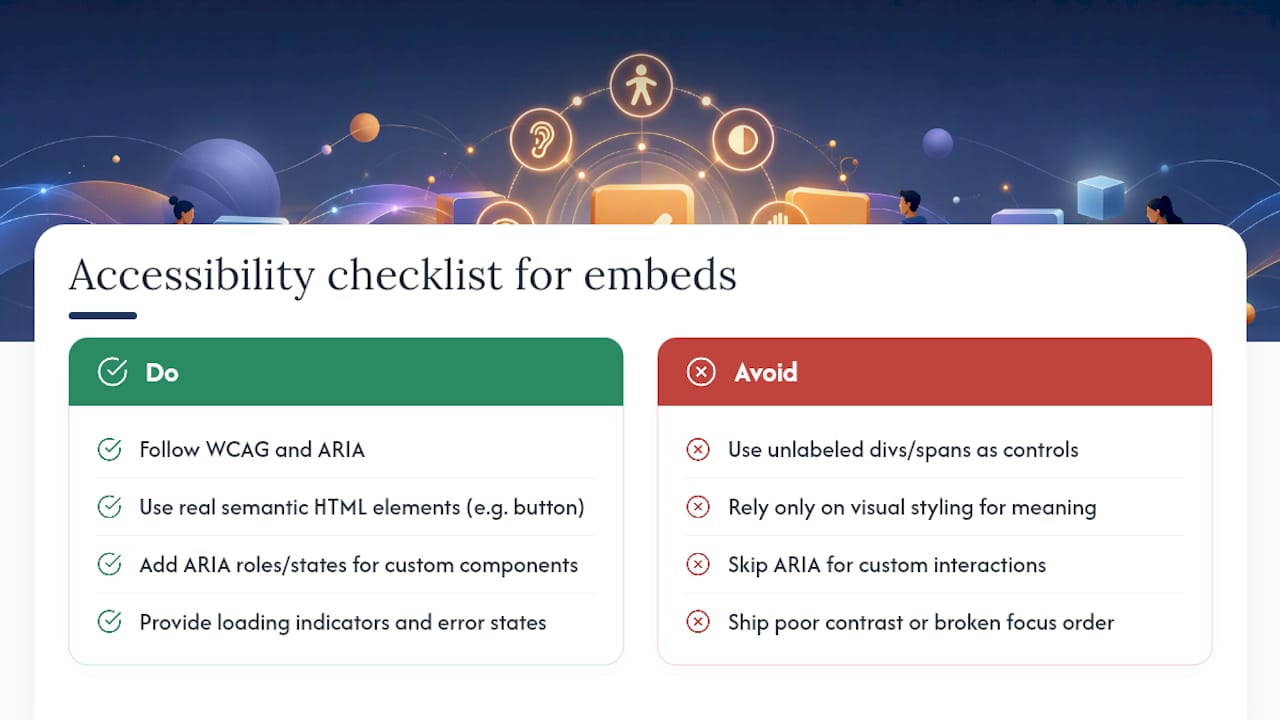
Even when your priority is speed and low friction rather than disability accommodation, the technical standards that govern accessible markup double as the standards that keep your widget indexable, screen-reader-safe, and resilient to browser quirks. The Web Content Accessibility Guidelines (WCAG) and ARIA (Accessible Rich Internet Applications) specification are the two references worth having open while you build.
Practically, that means giving interactive elements inside the widget real semantic HTML rather than a stack of unlabeled <div> tags. A button should be a <button>, not a clickable span. Where custom components are unavoidable, such as a custom dropdown for pool selection, ARIA roles and states (role="button", aria-expanded, aria-live for score updates) tell assistive technology and search crawlers alike what the element does.
Integration guidance from Sportradar's widget documentation treats semantic markup and ARIA attributes as standard, not optional, alongside loading indicators and error states. That framing matters for a publisher's SEO too: search engines parse structured, labeled content far more reliably than a visually identical but semantically empty widget.
Color contrast ratios, keyboard focus order, and legible font sizing also happen to be the same choices that make a widget usable on a cracked phone screen in direct sunlight, which is the actual environment most sports fans use when checking a score during a game. Build to the standard once, and you get both compliance and broader usability out of the same work.
Designing for Different Player Situations
A fantasy widget gets used in wildly different conditions: one thumb on a crowded train, a shared living-room tablet, a slow rural connection, a distracted glance during a commercial break. Designing for that range of situations, rather than for an idealized desktop user, is what actually broadens your audience.
Tap targets need enough size and spacing that a player with limited fine motor control, or simply a player walking down the street, can hit the right button on the first try. A 44 by 44 pixel minimum touch target is a reasonable floor. Widgets that rely purely on hover states for key information (a tooltip that only appears on mouseover) fail anyone using a touchscreen, which by now is most of your traffic.
For vision, don't encode meaning in color alone. A "green means winning, red means losing" scoreboard needs a text label or icon alongside the color, since color-blind players and anyone in bright glare will miss the distinction otherwise. For hearing, avoid depending on audio cues to signal a score change or game end. A visual pulse or badge update covers the same moment silently.
Cognitive load matters as much as any sensory consideration. Short instructions, one action per screen, and consistent placement of the CTA across every widget you ship reduce the mental overhead of figuring out a new interface each time. A player who already understands your leaderboard widget shouldn't have to relearn the layout for your picks card.
Testing Tools and Methods for Accessible Widgets
You don't need a dedicated QA team to catch the majority of problems before launch. A short, repeatable testing pass covers most of what matters.
Run Google's Lighthouse or PageSpeed Insights against the embed page to surface both performance and accessibility flags in one report, including missing ARIA labels and insufficient contrast ratios. Pair that with a manual keyboard-only pass: tab through the entire widget without touching a mouse or screen, and confirm every interactive element is reachable and its focus state is visible.
A screen reader spot-check, using VoiceOver on iOS or macOS or NVDA on Windows, catches issues automated tools miss, particularly around whether score updates and dynamic content get announced through aria-live regions. Browser DevTools' built-in accessibility inspector shows you the computed accessibility tree for each element, which is the fastest way to confirm your semantic markup actually reads the way you intended.
For performance testing specifically, throttle your connection to slow 4G in DevTools and reload. If your widget still shows a usable skeleton state and completes its first render within a couple of seconds under those conditions, it will perform acceptably for the bulk of mobile traffic. Betting and picks-widget integration guides recommend exactly this combination of PageSpeed testing and throttled network checks before pushing an embed to production.
Test on at least one older Android device if you can get your hands on one. It surfaces rendering and touch-target problems that a current-generation iPhone will never reveal.
Localization and Language Support for Wider Reach
A widget that only speaks one language caps its own audience the moment a publisher's readership extends beyond that language. Fantasy-sports terminology in particular varies enough between regions and languages that a literal translation of your interface copy can confuse rather than clarify.
Start with the interface layer, not the content layer: button labels, instructions, and error messages should pull from a translation table rather than being hardcoded, so adding a new language is a configuration change, not a rebuild. Date, time, and number formats need to follow the visitor's locale too. A pool deadline shown as "3/4" reads as March 4 to an American audience and April 3 to much of the rest of the world.
Numeral and text direction matter for some languages beyond simple translation. Right-to-left languages need the entire widget layout mirrored, not just the text flipped, or buttons and score displays end up in a disorienting order.
Keep player-facing sports terminology consistent with how local fans actually talk about the sport. A widget translated by a generic tool often gets scoring terms technically correct but culturally off, which undermines trust with a fanbase that lives in that vocabulary daily. If your traffic skews international, prioritize the languages your analytics already show visiting, rather than guessing at demand.
Popular Features in Accessible Fantasy Widgets
The widgets that spread across sports sites share a short list of recurring features, and each one earns its place by lowering the bar to a first play rather than adding complexity.
Contest pools with a fixed, short duration (one game, one week) let a casual fan commit without wondering what they signed up for long-term. DIY custom pools give a slightly more engaged user the ability to set up a private group among friends or coworkers, which drives organic sharing without any marketing spend. Leaderboards, particularly ones that update live during a game, give players a reason to check back mid-event rather than only after it ends.
Trivia and puzzle formats serve a different audience: fans who want a 60-second engagement rather than a season-long commitment. These lightweight formats are often the easiest entry point for a publisher testing embeds for the first time, since they require no ongoing roster management. Rewards points and archived results give players a sense of progress across sessions, turning a one-off play into a returning habit.
Megasports-arena's sports rummy game is built around exactly this kind of short-session, leaderboard-driven format, and its leaderboard page shows how a live ranking display keeps players checking back without requiring a rules refresher each visit. For inspiration on puzzle-style formats specifically, the range of sports puzzle games built for one-minute play sessions shows how much engagement a low-commitment format can generate.
Collecting Feedback to Keep Improving Accessibility
The fastest way to find out a widget is confusing is to ask the people using it, and the cheapest way to ask is to build the question into the widget itself. A one-tap thumbs-up-or-down prompt after a play cycle, shown only occasionally so it doesn't become its own friction point, gathers a surprising amount of signal over a few weeks.
Session recording tools show you where players hesitate or misclick, which is often more revealing than any survey. If a heatmap shows repeated taps on a non-interactive element, that's a design cue disguised as a bug report. Pair that with your analytics funnel: a sharp drop-off at a specific screen inside the widget tells you exactly where onboarding is losing people, without anyone having to say a word.
Direct outreach still matters. A short, optional survey link in a post-play confirmation screen, or a feedback email address in your widget's footer, catches issues that automated tools can't, particularly from players using assistive technology or older devices your test suite didn't cover. Support tickets and app-store-style reviews, if your embed lives inside a broader platform, are worth reading in full rather than skimming for star ratings.
Treat every piece of feedback as a hypothesis to test, not a mandate to implement immediately. Not every complaint reflects a majority of your players, but a pattern across multiple channels, session recordings, surveys, and support messages pointing at the same friction point, is worth acting on quickly.
A Publisher's View on Building Accessible Embeds
Publishers overbuild before they ever test with real traffic. Megasports-arena's own catalog runs on the opposite bet: no-code embeddable games, a documented how-to-play flow, and a blog full of implementation specifics, because a single widget tested honestly beats five widgets nobody finished building. Preview a demo, drop in the embed snippet, then measure the play-rate uplift before deciding what comes next.
— peter
Try an Embeddable Game on Your Site Today
Megasports-arena gives publishers a shortcut around the whole build-versus-buy decision this article just walked through. Instead of engineering an iframe, wiring up lazy loading, and testing Core Web Vitals from scratch, you preview an already-optimized game, drop in a snippet, and start measuring within the same week.

Getting started takes three steps. First, preview the sports rummy game to see how the widget behaves on both desktop and mobile before committing to anything. Second, copy the embed snippet from the game's landing page and drop it into a placement on your site, following the reserved-sizing and lazy-loading guidance from the checklist above. Third, watch play rate and share rate over the first two weeks to see the actual engagement lift on the page carrying it.
If you want the mechanics behind a specific feature first, the how-to-play guide covers the rules a new player sees, and the no-code embed walkthrough covers what a non-developer needs to get a game live without touching a backend. For design inspiration beyond sports, the immersive exhibition design checklist is a useful outside reference on keeping interactive experiences intuitive for a first-time visitor. Preview a game, embed it, and check your analytics in a week. That's the whole test.
Sources
- Widgets integration best practices (Sportradar API docs)
- Build a live stats hub for fantasy sports fans
- Core Web Vitals & Embedding Widgets: Speed Impact
- Build an embeddable sports picks widget (2026 Guide)
- How to develop an app like Underdog Fantasy (2026 Guide)